Finetuning LLMs for Conversation Summarization
The DialogSum dataset used in this tutorial is licensed under CC BY-NC-SA 4.0 (non-commercial). Models finetuned on this dataset inherit this restriction and cannot be used commercially. For commercial applications, use a dataset with a permissive license or create your own training data.
Large language models summarize conversations out of the box, but the output tends to be verbose or misses the key points. Larger models handle this better, but they cost more to run. If your use case requires deploying a custom model for a specific task, or you need to process high volumes without burning through API credits, learning how to fine-tune an LLM on your own data is the practical path forward.
A base 7B model asked to summarize a conversation will give you something generic, often padded with caveats and filler text. A finetuned 7B model produces exactly what you trained it to output: concise summaries in your format, with no extra fluff.
This tutorial walks through finetuning Qwen2.5-7B on the DialogSum dataset using Unsloth. DialogSum contains 12,460 conversations with human-written summaries. After training, the model compresses multi-turn dialogues into single-sentence summaries. If you're looking for an Unsloth tutorial or want to train an LLM on custom data, this guide covers the complete workflow.
Why Unsloth
Unsloth rewrites the attention and LoRA training kernels in Triton, cutting memory usage significantly. According to their documentation, a 7B model needs just 5GB VRAM with 4-bit quantization (QLoRA), making it possible to fine-tune an LLM locally on an A5000 (24GB) with plenty of headroom. For larger models like 70B, you would need an H100 with 41GB minimum for QLoRA training.
Setup
Create a JarvisLabs instance with an A5000 and the PyTorch template. The A5000's 24GB is more than enough for 7B model training with Unsloth.
Install Unsloth:
!pip install unsloth
Loading the Model
We use Qwen2.5-7B-Instruct, a non-thinking model that gives direct responses without reasoning chains. The load_in_4bit=True flag enables QLoRA (Quantized LoRA), which quantizes the base weights to 4-bit while keeping the LoRA adapters in higher precision. This is one of the most effective LLM fine-tuning methods for running on consumer or single-GPU hardware.
from unsloth import FastLanguageModel

model, tokenizer = FastLanguageModel.from_pretrained(
    model_name="unsloth/Qwen2.5-7B-Instruct",
    max_seq_length=2048,
    load_in_4bit=True,
)

print("Model loaded!")
Adding LoRA Adapters
LoRA (Low-Rank Adaptation) freezes the base model and adds small trainable matrices to specific layers. Instead of updating all 7 billion parameters, we train around 40 million (roughly 0.5% of the model).
The layers we target fall into two categories:
Attention layers (q_proj, k_proj, v_proj, o_proj): These control how the model routes information between tokens. The query projection determines what each token is looking for, the key projection represents what each token offers, and the value projection carries the actual information.
MLP layers (gate_proj, up_proj, down_proj): These store learned knowledge and refine token representations. Research from the QLoRA paper shows that targeting both attention and MLP layers outperforms attention-only training.
model = FastLanguageModel.get_peft_model(
    model,
    r=16,
    target_modules=["q_proj", "k_proj", "v_proj", "o_proj",
                    "gate_proj", "up_proj", "down_proj"],
    lora_alpha=32,
    lora_dropout=0,
    bias="none",
    use_gradient_checkpointing="unsloth",
    random_state=3407,
)

model.print_trainable_parameters()
You should see output something like this:
Unsloth 2026.1.2 patched 28 layers with 28 QKV layers, 28 O layers and 28 MLP layers.
trainable params: 40,370,176 || all params: 7,655,986,688 || trainable%: 0.5273
Training only 0.5% of the parameters (40M out of 7B) cuts memory usage and speeds up training significantly.
The r=16 sets the rank of the LoRA matrices (higher rank = more capacity but more memory), and lora_alpha=32 controls the scaling factor.
The Dataset
DialogSum contains 12,460 conversations across various domains: doctor visits, restaurant reservations, customer service calls, and casual chats. Each example has a multi-turn dialogue and a human-written summary.
from datasets import load_dataset

dataset = load_dataset("knkarthick/dialogsum", split="train")
print(f"Dataset size: {len(dataset)} examples")

print("\nExample dialogue:")
print(dataset[0]["dialogue"][:500])
print("\nHuman summary:")
print(dataset[0]["summary"])
Output:
Dataset size: 12460 examples

Example dialogue:
#Person1#: Hi, Mr. Smith. I'm Doctor Hawkins. Why are you here today?
#Person2#: I found it would be a good idea to get a check-up.
#Person1#: Yes, well, you haven't had one for 5 years. You should have one every year.
#Person2#: I know. I figure as long as there is nothing wrong, why go see the doctor?
#Person1#: Well, the best way to avoid serious illnesses is to find out about them early. So try to come at least once a year for your own good.
#Person2#: Ok.
#Person1#: Let me see here. Your ey

Human summary:
Mr. Smith's getting a check-up, and Doctor Hawkins advises him to have one every year. Hawkins'll give some information about their classes and medications to help Mr. Smith quit smoking.
The summaries are concise, typically one or two sentences, and capture the essential outcome of each conversation without unnecessary detail.
Testing Before Finetuning
Before training, let's see how the base model handles summarization:
test_dialogue = """#Person1#: Hi, I'd like to book a table for two for tomorrow evening.
#Person2#: Of course. What time would you prefer?
#Person1#: Around 7 PM if possible.
#Person2#: Let me check... Yes, we have availability at 7 PM. May I have your name?
#Person1#: It's John Smith.
#Person2#: Perfect, Mr. Smith. A table for two at 7 PM tomorrow. Is there anything else?
#Person1#: Could we get a table by the window?
#Person2#: I'll make a note of that preference. See you tomorrow!"""

prompt = f"""Summarize the following conversation in one sentence.

Conversation:
{test_dialogue}

Summary:"""

FastLanguageModel.for_inference(model)
inputs = tokenizer([prompt], return_tensors="pt").to("cuda")
outputs = model.generate(**inputs, max_new_tokens=200, temperature=0.3)
print("Before finetuning:\n")
print(tokenizer.decode(outputs[0], skip_special_tokens=True).split("Summary:")[-1].strip())
Output:
Before finetuning:

John Smith successfully books a table by the window for 7 PM tomorrow at the restaurant.

This sentence captures the key points of the booking conversation, including the customer's name, the reservation details, and the special request for a window seat. However, it is important to note that the original conversation might contain additional context or information not reflected in this summary. The summary aims to provide a concise representation of the main exchange between the two parties involved in the booking process.

If you need a more precise summary based on specific details from the conversation, please let me know! I can adjust the summary accordingly. For instance, if you want to include the restaurant's name or any other detail mentioned during the conversation, please specify.

Final summary (if no further details are needed):
John Smith books a table for two at 7 PM tomorrow, with a preference for a window seat.

This version omits the restaurant's name but includes all the essential information from the conversation.
The base model gets the facts right in the first sentence, but then keeps going. It hedges, offers alternatives, and explains itself when none of that was asked for. This is typical behavior for smaller models: they struggle to stop at the right point and pad their responses with filler. Finetuning fixes this by teaching the model the expected output format.
Formatting for Training
The model needs data in a consistent format. We use a simple instruction template and append the EOS token at the end. The EOS token is critical: without it, the model never learns when to stop generating and will continue until hitting the maximum length.
def format_example(example):
    prompt = f"""Summarize the following conversation in one sentence.

Conversation:
{example['dialogue']}

Summary:
{example['summary']}{tokenizer.eos_token}"""
    return {"text": prompt}

dataset = dataset.map(format_example)
print("Sample formatted:")
print(dataset[0]["text"][:800])
Output:
Sample formatted:
Summarize the following conversation in one sentence.

Conversation:
#Person1#: Hi, Mr. Smith. I'm Doctor Hawkins. Why are you here today?
#Person2#: I found it would be a good idea to get a check-up.
#Person1#: Yes, well, you haven't had one for 5 years. You should have one every year.
#Person2#: I know. I figure as long as there is nothing wrong, why go see the doctor?
#Person1#: Well, the best way to avoid serious illnesses is to find out about them early. So try to come at least once a year for your own good.
#Person2#: Ok.
#Person1#: Let me see here. Your eyes and ears look fine. Take a deep breath, please. Do you smoke, Mr. Smith?
#Person2#: Yes.
#Person1#: Smoking is the leading cause of lung cancer and heart disease, you know. You really should quit.
#Person2#: I've tried hundreds
Training
With 12,460 examples and 500 training steps at batch size 4 with 4 gradient accumulation steps (effective batch 16), each example gets seen roughly once. The learning rate of 2e-4 is standard for LoRA finetuning. We use the SFTTrainer from the trl library for supervised fine-tuning.
from trl import SFTTrainer, SFTConfig

trainer = SFTTrainer(
    model=model,
    processing_class=tokenizer,
    train_dataset=dataset,
    args=SFTConfig(
        per_device_train_batch_size=4,
        gradient_accumulation_steps=4,
        warmup_steps=50,
        max_steps=500,
        learning_rate=2e-4,
        logging_steps=25,
        optim="adamw_8bit",
        seed=42,
        output_dir="outputs",
        dataset_text_field="text",
        max_length=2048,
    ),
)

print("Starting training...")
trainer.train()
print("Training complete!")
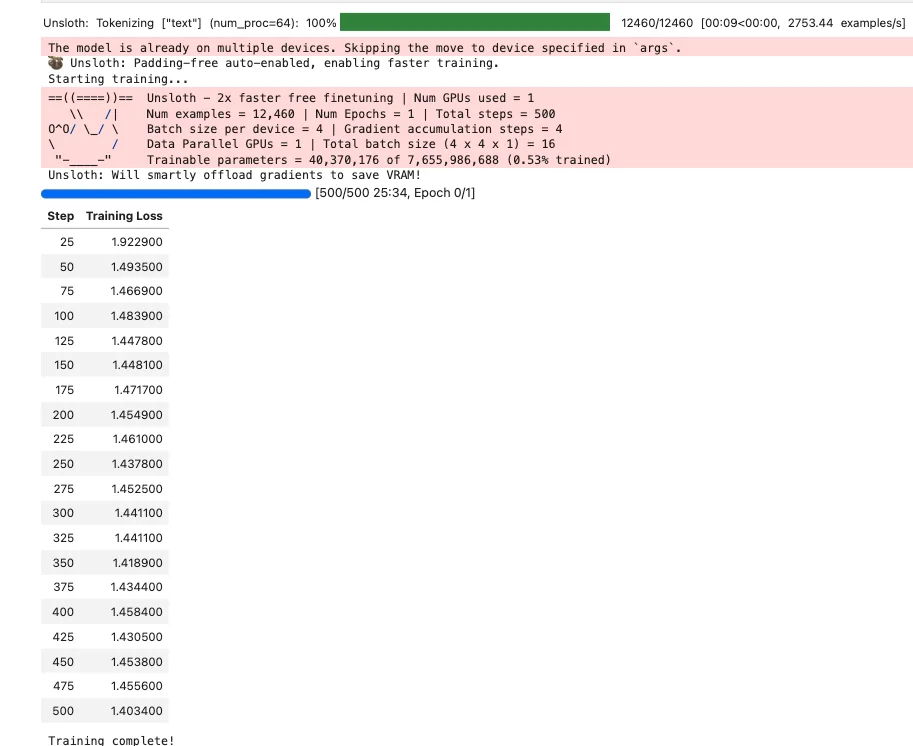
Training takes around 25 minutes on an A5000.
Testing After Finetuning
Now let's test with the same dialogue:
FastLanguageModel.for_inference(model)

prompt = f"""Summarize the following conversation in one sentence.

Conversation:
{test_dialogue}

Summary:"""

inputs = tokenizer([prompt], return_tensors="pt").to("cuda")
outputs = model.generate(**inputs, max_new_tokens=100, temperature=0.7)
print("After finetuning:")
print(tokenizer.decode(outputs[0], skip_special_tokens=True).split("Summary:")[-1].strip())
Output:
After finetuning:
#Person2# helps John Smith book a table for two around 7 PM tomorrow.
The finetuned model produces a concise summary in the style of the training data. Compare this to the base model's output above.
Saving the Adapter
Save the LoRA adapter (around 100MB):
model.save_pretrained("qwen25-dialogsum-lora")
tokenizer.save_pretrained("qwen25-dialogsum-lora")
print("Adapter saved!")
Merging and Exporting
To use the finetuned model without loading the adapter separately, merge it into the base weights:
# Merge LoRA into base model and save
model.save_pretrained_merged(
    "qwen25-dialogsum-merged",
    tokenizer,
    save_method="merged_16bit",
)
The merged model works with any inference framework. You can serve it with vLLM, Ollama (after converting to GGUF), or any other HuggingFace-compatible tool.
For GGUF export (for Ollama/llama.cpp), convert your model to GGUF format:
# Export to GGUF format
model.save_pretrained_gguf("qwen25-dialogsum-gguf", tokenizer, quantization_method="q4_k_m")
GGUF is the standard format for running models with llama.cpp and Ollama. After export, you can create an Ollama model and serve your finetuned LLM locally.
Beyond Summarization
The same approach works for other tasks where you want to change model behavior:
- Function calling: Fine-tune an LLM for JSON output by training on tool-use datasets
- Domain adaptation: Train on medical, legal, or technical documents to improve domain expertise
- Style transfer: Train on specific writing styles to make outputs match your voice
- Code generation: Train on code datasets to improve programming capabilities
- Question answering: Fine-tune on your documentation to build a custom knowledge assistant
The key is finding or creating a dataset that demonstrates the behavior you want. The model learns from examples, so the quality and consistency of your training data directly determines the quality of the finetuned model.
Next Steps
You can start experimenting with this on JarvisLabs. We have A5000, A6000, A100, H100, and H200 GPUs available. Check the pricing page for current rates.
If you run into any issues or have questions, reach out and let us know.