vLLM Optimization Techniques: 5 Practical Methods to Improve Performance


Running large language models efficiently can be challenging. You want good performance without overloading your servers or exceeding your budget. That's where vLLM comes in - but even this powerful inference engine can be made faster and smarter.
In this post, we'll explore five cutting-edge optimization techniques that can dramatically improve your vLLM performance:
- Prefix Caching - Stop recomputing what you've already computed
- FP8 KV-Cache - Pack more memory efficiency into your cache
- CPU Offloading - Make your CPU and GPU work together
- Disaggregated P/D - Split processing and serving for better scaling
- Zero Reload Sleep Mode - Keep your models warm without wasting resources
Each technique addresses a different bottleneck, and together they can significantly improve your inference pipeline performance. Let's explore how these optimizations work.
Prefix Caching
Prefix caching is a smart way to avoid repeating the same computations. When multiple requests share the same beginning (prefix), vLLM stores the computed results for that common part and reuses them for new requests.
Think of it like this: if you're processing multiple conversations that all start with the same system prompt, you don't need to recompute the attention and key-value pairs for that prompt every time.
How Does It Work?
- Identify Common Prefixes: vLLM detects when incoming requests share the same starting tokens
- Cache Results: The computed attention states and KV cache for the prefix are stored in memory
- Reuse When Possible: New requests with the same prefix skip the computation and use cached results
- Continue from Cache: Processing continues from where the cached prefix ends
Prefix caching works best when you have system prompts that repeat across many requests, few-shot examples that appear in multiple prompts, template-based generation where requests follow similar patterns, or batch processing scenarios with multiple variations of similar inputs. The main advantages include reduced latency by skipping redundant computations and better throughput since you can process more requests with the same resources. It can also reduce duplicate KV storage for repeated prefixes; however, benefits depend on cache hit rate and KV cache pressure—the cache itself occupies KV cache space which may reduce available space for other concurrent sequences.
Important: Prefix caching primarily improves the prefill phase (and thus TTFT), since that's when the cached KV blocks are reused instead of being recomputed. It does not speed up the decode phase in the same way—decode still generates tokens autoregressively one at a time.
Example Scenario
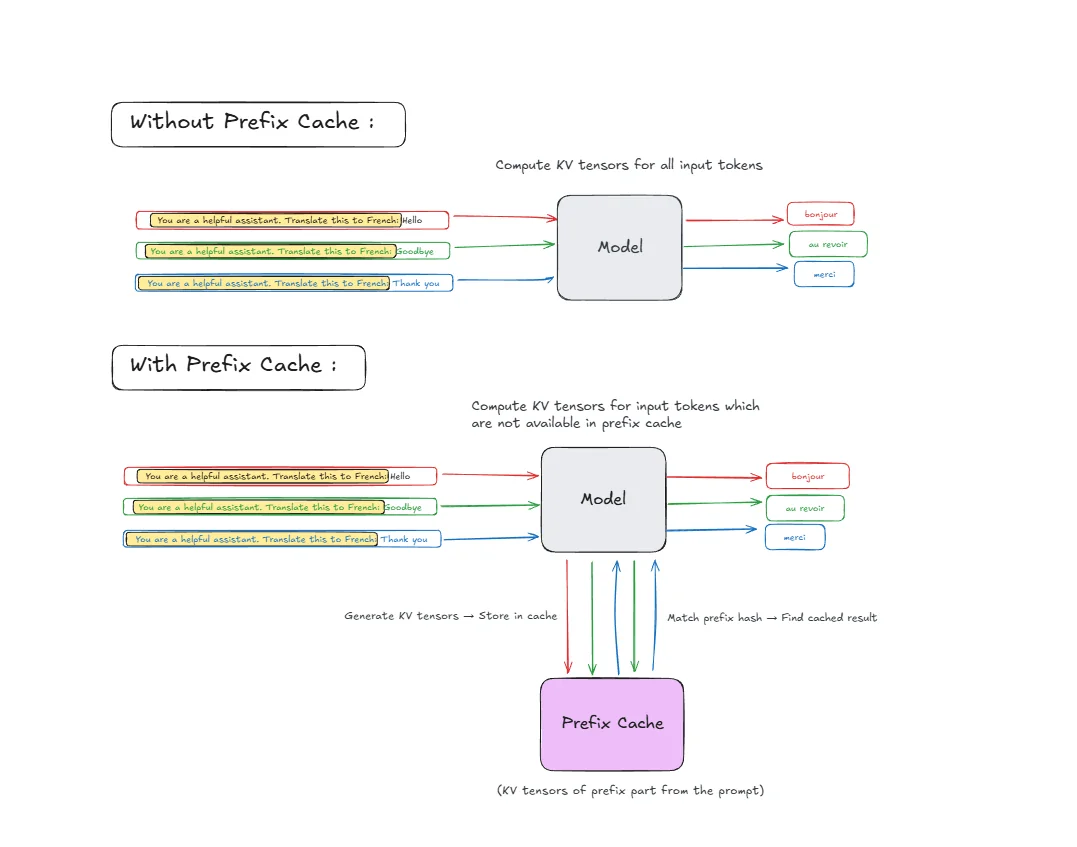
Request 1: "You are a helpful assistant. Translate this to French: Hello"
Request 2: "You are a helpful assistant. Translate this to French: Goodbye"
Request 3: "You are a helpful assistant. Translate this to French: Thank you"
How it works step by step:
-
Tokenization: Each prompt gets broken down into tokens. The prefix "You are a helpful assistant. Translate this to French:" becomes multiple tokens.
-
Hash Generation: vLLM generates a hash for the prefix tokens using algorithms like SHA-256 or faster alternatives like xxHash for quick lookup. For multi-tenant or safety-sensitive setups, SHA-256 is the safer default because non-cryptographic hashes can theoretically collide.
-
First Request Processing:
- Compute KV-tensors for all prefix tokens
- Store the computed KV-tensors in prefix cache with the hash as key
- Continue processing the unique part ("Hello")
-
Subsequent Requests:
- Generate hash for incoming prefix tokens
- Match hash against cached entries
- Reuse cached KV-tensors if found
- Only compute KV-tensors for the unique parts ("Goodbye", "Thank you")
This means vLLM computes the expensive attention calculations for "You are a helpful assistant. Translate this to French:" only once, saving significant computation time for requests 2 and 3.
Getting the Hardware
To do the experiments you can rent a GPU at JarvisLabs.
Here's how to set up your own instance:
- Log in to JarvisLabs and navigate to the dashboard.
- Create an Instance: Click Create and select your desired GPU configuration.
- Select Your GPU:
- Choose A100 for higher performance and it is sufficient for experiments from this blog post.
- Choose the Framework: Select PyTorch from the available frameworks.
- Launch: Click Launch. Your instance will be ready in a few minutes.
Real-World Performance Test
We conducted a practical test to measure prefix caching effectiveness using the Qwen3-32B model.
Experimental Setup:
- Model: Qwen3-32B (32B parameter model).
- Test Dataset: Custom dataset with 20 questions about a technical document.
Deployment Commands:
Without prefix caching:
vllm serve Qwen/Qwen3-32B \
    --no-enable-prefix-caching \
    --dtype bfloat16 \
    --max-model-len 32768 \
    --gpu-memory-utilization 0.95
With prefix caching enabled:
vllm serve Qwen/Qwen3-32B \
    --enable-prefix-caching \
    --dtype bfloat16 \
    --max-model-len 32768 \
    --gpu-memory-utilization 0.95
Key Argument:
--enable-prefix-caching/--no-enable-prefix-caching: Enables or disables automatic prefix caching.
Benchmarking:
vllm bench serve \
    --model Qwen/Qwen3-32B \
    --dataset-name custom \
    --dataset-path iris_prefix_cache_benchmark.jsonl \
    --num-prompts 200
I have pushed my dataset on Hugging Face with the dataset preparation script here.
Results
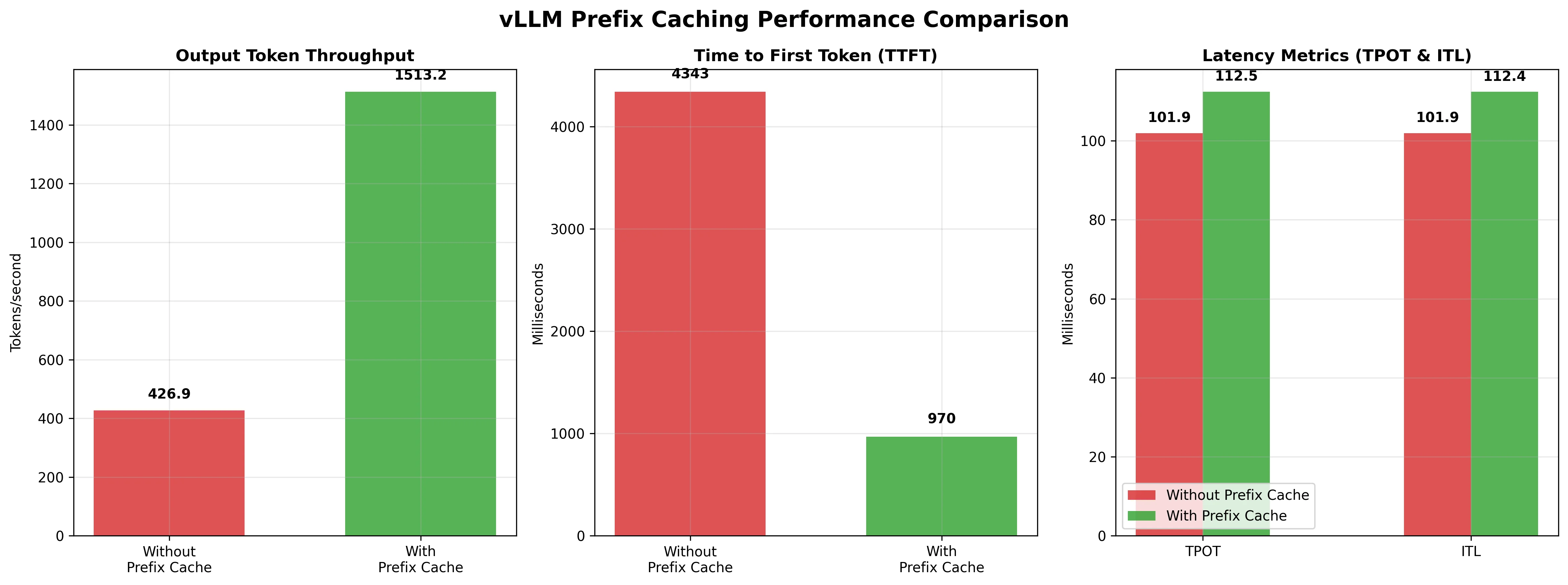
| Metric | Without Prefix Caching | With Prefix Caching | Difference | % Change |
|---|---|---|---|---|
| Output token throughput (tok/s) | 426.89 | 1,513.23 | +1,086.34 | +254% |
| Mean TTFT (ms) | 4,343.00 | 969.71 | -3,373.29 | -78% |
| Mean TPOT (ms) | 101.94 | 112.45 | +10.51 | +10% |
| Mean ITL (ms) | 101.94 | 112.42 | +10.48 | +10% |
Results Analysis:
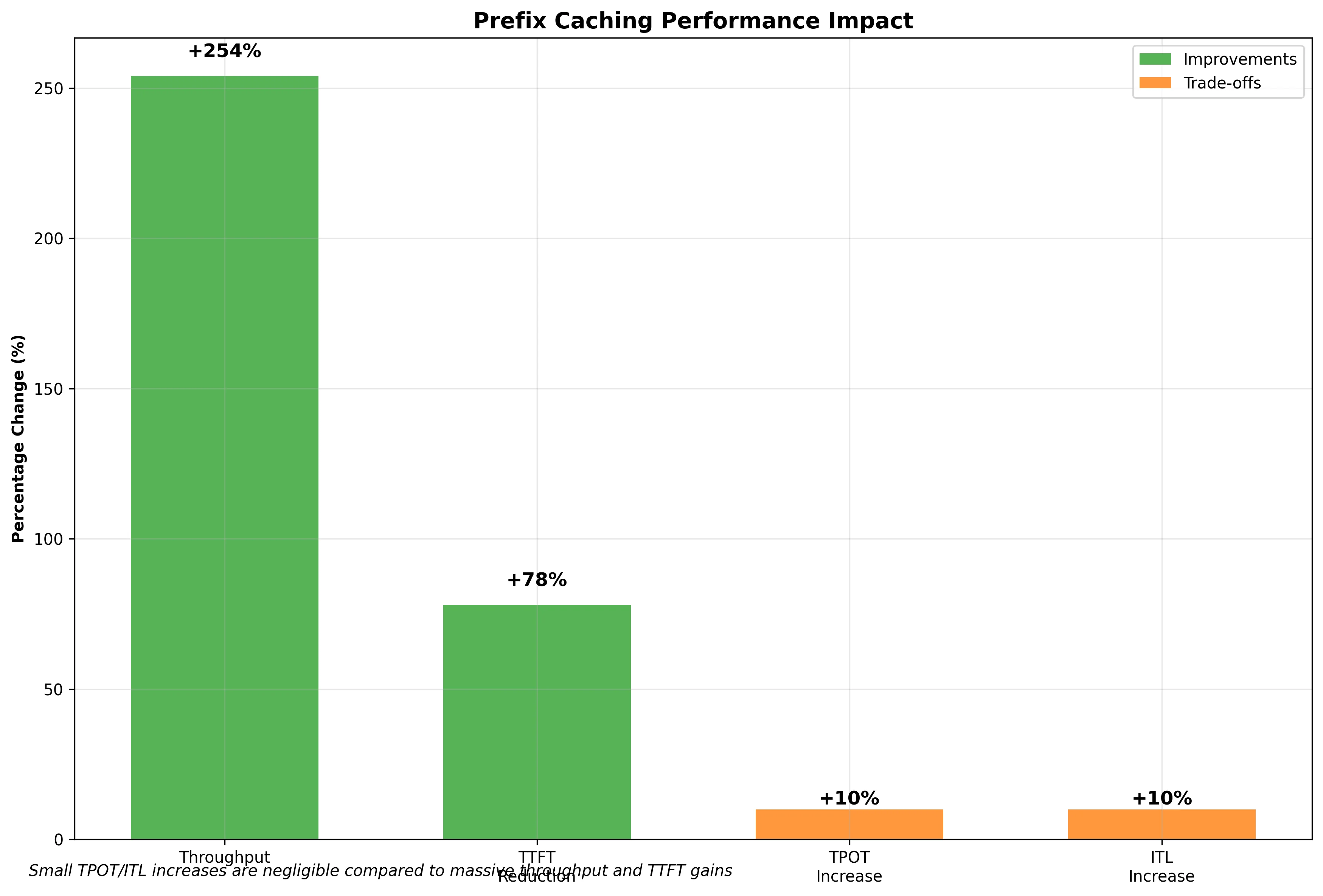
The results show dramatic improvements with prefix caching enabled:
-
Output token throughput increased by 254% (from 427 to 1,513 tokens/second), meaning the system can process over 3.5x more tokens per second.
-
Time to First Token (TTFT) Reduced by 78% (from 4.3 seconds to under 1 second), significantly improving user experience by delivering results faster.
-
Time Per Output Token (TPOT) and Inter-Token Latency (ITL) : Slightly increased by about 10%, which is expected as the system spends a small amount of time checking the cache, but this overhead is negligible compared to the massive gains.
Also, cache hit rate was around 50% when we activated the prefix caching.
Ready to start building?
Get a GPU instance running in 90 seconds. JupyterLab, VS Code, or SSH. Per-minute billing so you only pay for what you use.
Try Jarvislabs FreeKV-Cache Quantization (FP8 KV-Cache)
FP8 (8-bit floating point) KV-Cache is a memory optimization technique that reduces the precision of key-value tensors stored in GPU memory. Instead of using standard FP16 (16-bit) or FP32 (32-bit) precision, vLLM can store KV-cache data in FP8 format, cutting memory usage roughly in half compared to FP16.
The KV-cache stores attention keys and values for all previous tokens during inference. As sequences get longer, this cache can consume significant GPU memory, especially for large models and long contexts.
FP8 Format Options
vLLM supports several FP8 quantization formats for KV-cache optimization:
- fp8_e4m3: 4-bit exponent, 3-bit mantissa - better for values with smaller dynamic range
- fp8_e5m2: 5-bit exponent, 2-bit mantissa - better for values with larger dynamic range
- fp8_inc: Intel's FP8 format optimized for Intel hardware
- fp8_ds_mla: A specialized FP8 KV-cache format used by certain MLA-based (Multi-head Latent Attention) models and backends, such as DeepSeek variants. This is not a general-purpose FP8 mode—it includes format-specific details like scale storage and may store parts in bf16 for accuracy.
Each format offers different trade-offs between numerical precision and memory efficiency.
Quantization Implementation
vLLM supports two quantization strategies for FP8 KV-cache:
- Per-tensor quantization: A single scaling factor is applied to the entire tensor. This is the default and most widely supported approach.
- Per-attention-head quantization: Different scaling factors for each attention head, offering better precision preservation. This requires the Flash Attention backend and calibration tooling to be configured.
For a deeper understanding of how quantization works internally, including the mathematical foundations and implementation details, check out this comprehensive blog post on quantization techniques.
How Does It Work?
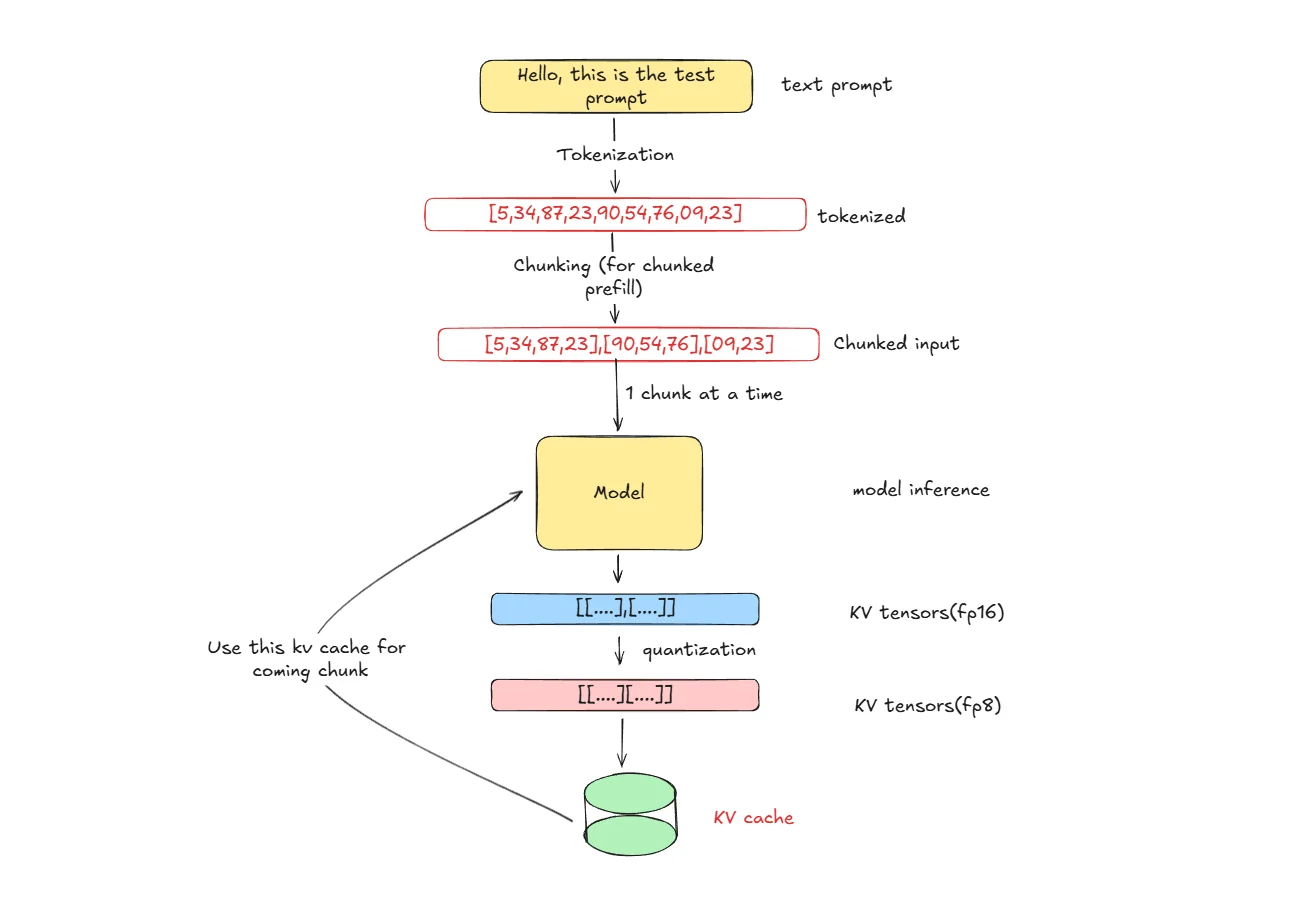
- Tokenization: Input text is broken down into tokens that the model can process
- Chunking: Tokens are divided into chunks for efficient processing (vLLM chunk prefill optimization)
- Model Inference: Model processes each chunk and generates KV-tensors in FP16 precision during attention computation
- Quantization: Convert KV-tensors from FP16 to FP8 format using scaling factors for numerical stability
- Storage & Reuse: Store quantized KV-tensors in cache and reuse them for subsequent chunks in the sequence, reducing redundant computation
Memory Savings Calculation
For a model with:
- Number of layers: 64
- Number of KV heads per layer: 8
- Head dimension: 128
- Sequence length: 8192 tokens
- Batch size: 8
Memory usage comparison (all layers for this batch):
- FP16 KV-Cache: batch × seq_len × num_layers × num_kv_heads × head_dim × 2 bytes × 2 (K+V) = 8 × 8192 × 64 × 8 × 128 × 2 × 2 = ~17.2 GB (~16 GiB)
- FP8 KV-Cache: Same formula with 1 byte instead of 2 = 8 × 8192 × 64 × 8 × 128 × 1 × 2 = ~8.6 GB (~8 GiB)
- Memory saved: ~8.6 GB (~50% reduction)
FP8 KV-Cache optimization is particularly effective when you have limited GPU memory, are processing long sequences, running large batch sizes, or deploying large models where memory is the primary bottleneck.
Performance Trade-offs
FP8 KV-Cache provides significant benefits including 50% reduction in KV-cache memory usage, allowing longer sequences or larger batch sizes, enabling deployment of larger models on memory-constrained GPUs, and reducing memory bandwidth requirements. However, there are some considerations including slight precision loss in attention computations, additional overhead for FP8 conversion, requirement for hardware support for optimal FP8 operations, and potential impact on output quality for precision-sensitive tasks.
Real-World Performance Test
We conducted a comprehensive test to measure FP8 KV-Cache effectiveness using the Qwen3-32B model with ShareGPT dataset.
Experimental Setup:
- Model: Qwen3-32B (32B parameter model)
- Dataset: ShareGPT_V3_unfiltered_cleaned_split.json
- Test Size: 1,000 prompts with maximum concurrency of 500
Deployment Commands:
Command to download dataset:
wget https://huggingface.co/datasets/anon8231489123/ShareGPT_Vicuna_unfiltered/resolve/main/ShareGPT_V3_unfiltered_cleaned_split.json
Without FP8 KV-Cache (FP16 default):
vllm serve Qwen/Qwen3-32B \
    --max-model-len 32768 \
    --gpu-memory-utilization 0.9 \
    --kv-cache-dtype auto
With FP8 KV-Cache enabled:
vllm serve Qwen/Qwen3-32B \
    --max-model-len 32768 \
    --gpu-memory-utilization 0.9 \
    --kv-cache-dtype fp8
Key Argument:
--kv-cache-dtype: Sets the data type for KV cache storage. Options include:auto: Uses the model's default precision (typically FP16/BF16)fp8/fp8_e4m3/fp8_e5m2: 8-bit floating point formats that halve KV cache memory usagefp8_ds_mla: Specialized FP8 format for MLA-based models (e.g., DeepSeek variants)
Benchmarking:
vllm bench serve \
    --model Qwen/Qwen3-32B \
    --dataset-name sharegpt \
    --dataset-path ShareGPT_V3_unfiltered_cleaned_split.json \
    --max-concurrency 500 \
    --num-prompts 1000
Results:
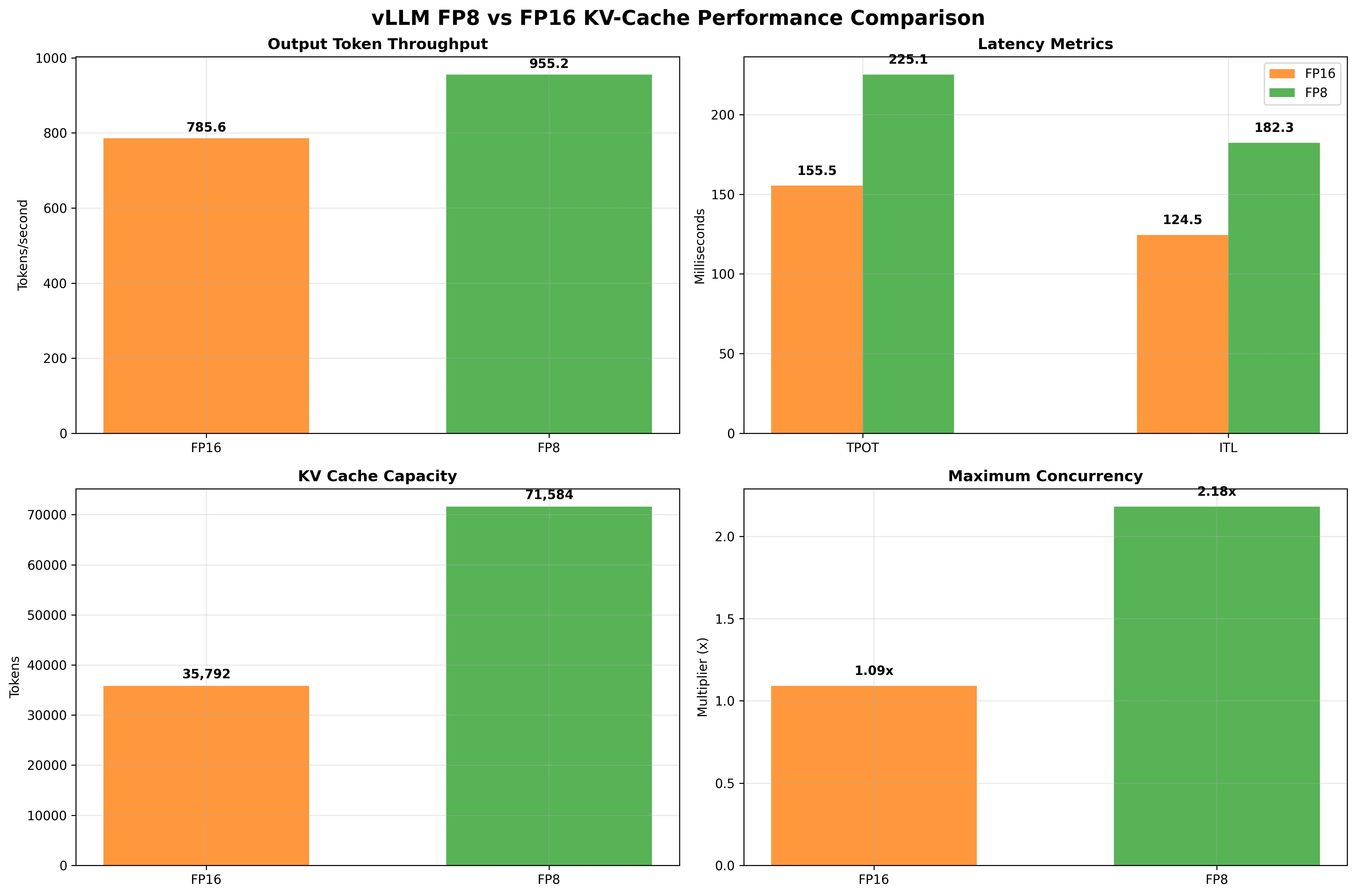
| Metric | KV Cache FP16 | KV Cache FP8 | Difference | % Change |
|---|---|---|---|---|
| Output token throughput (tok/s) | 785.61 | 955.22 | +169.61 | +22% |
| Mean TPOT (ms) | 155.50 | 225.07 | +69.57 | +45% |
| Mean ITL (ms) | 124.48 | 182.32 | +57.84 | +46% |
| KV cache size | 35,792 tokens | 71,584 tokens | +35,792 | +100% |
| Maximum concurrency | 1.09x (32,768 tokens) | 2.18x (32,768 tokens) | +1.09x | +100% |
Results Analysis:
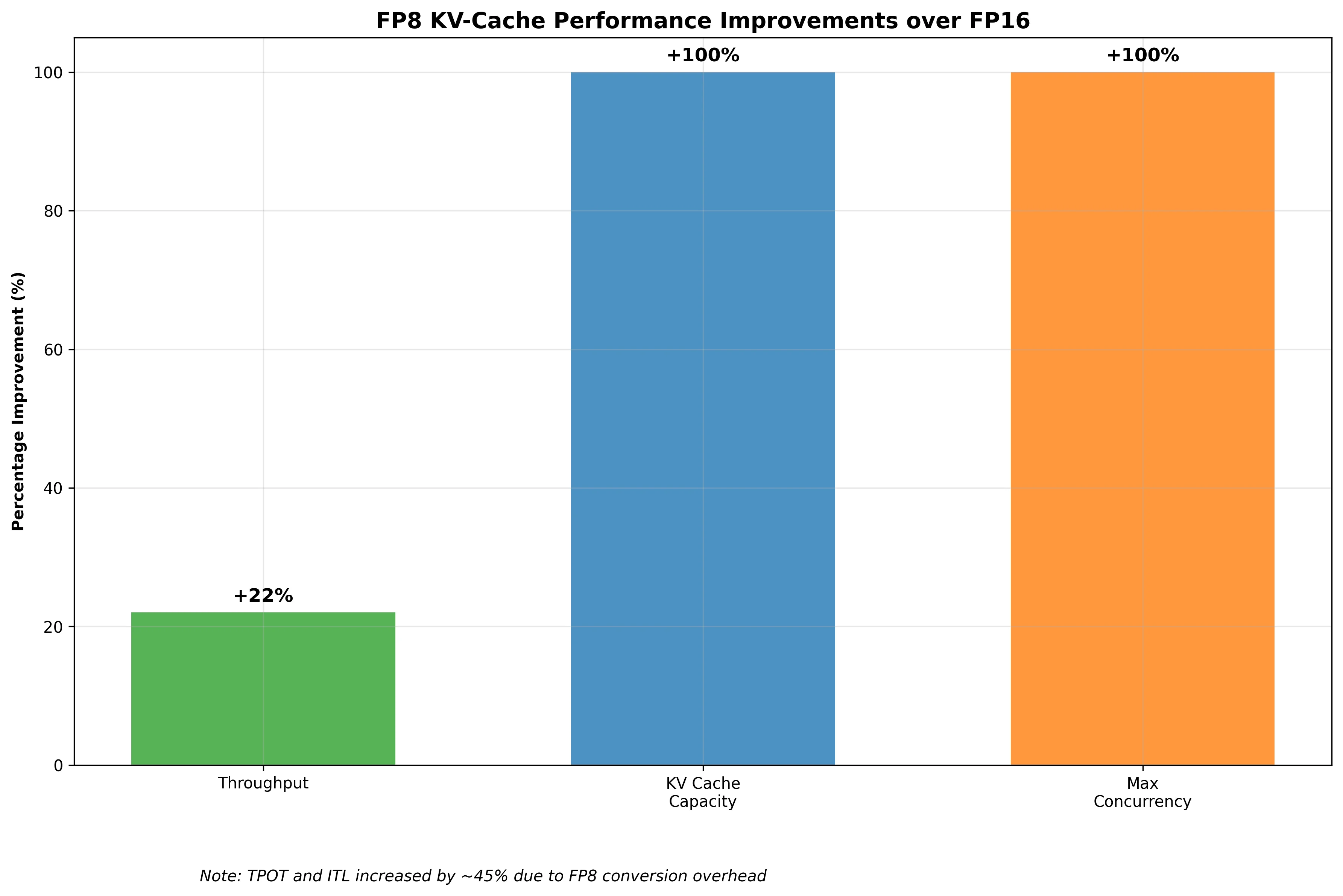
The results demonstrate significant improvements with FP8 KV-Cache:
-
Output token throughput increased by 22% (from 786 to 955 tokens/second), enabling higher request processing capacity.
-
KV cache capacity doubled from 35,792 to 71,584 tokens, allowing much longer sequences to be processed within the same memory constraints.
-
Maximum concurrency doubled from 1.09x to 2.18x, meaning the system can handle twice as many concurrent requests.
-
Time Per Output Token (TPOT) and Inter-Token Latency (ITL) increased by about 45-46%, which is the cost of FP8 conversion overhead, but the overall system performance still improved significantly due to better memory utilization.
CPU Offloading : KV-Cache
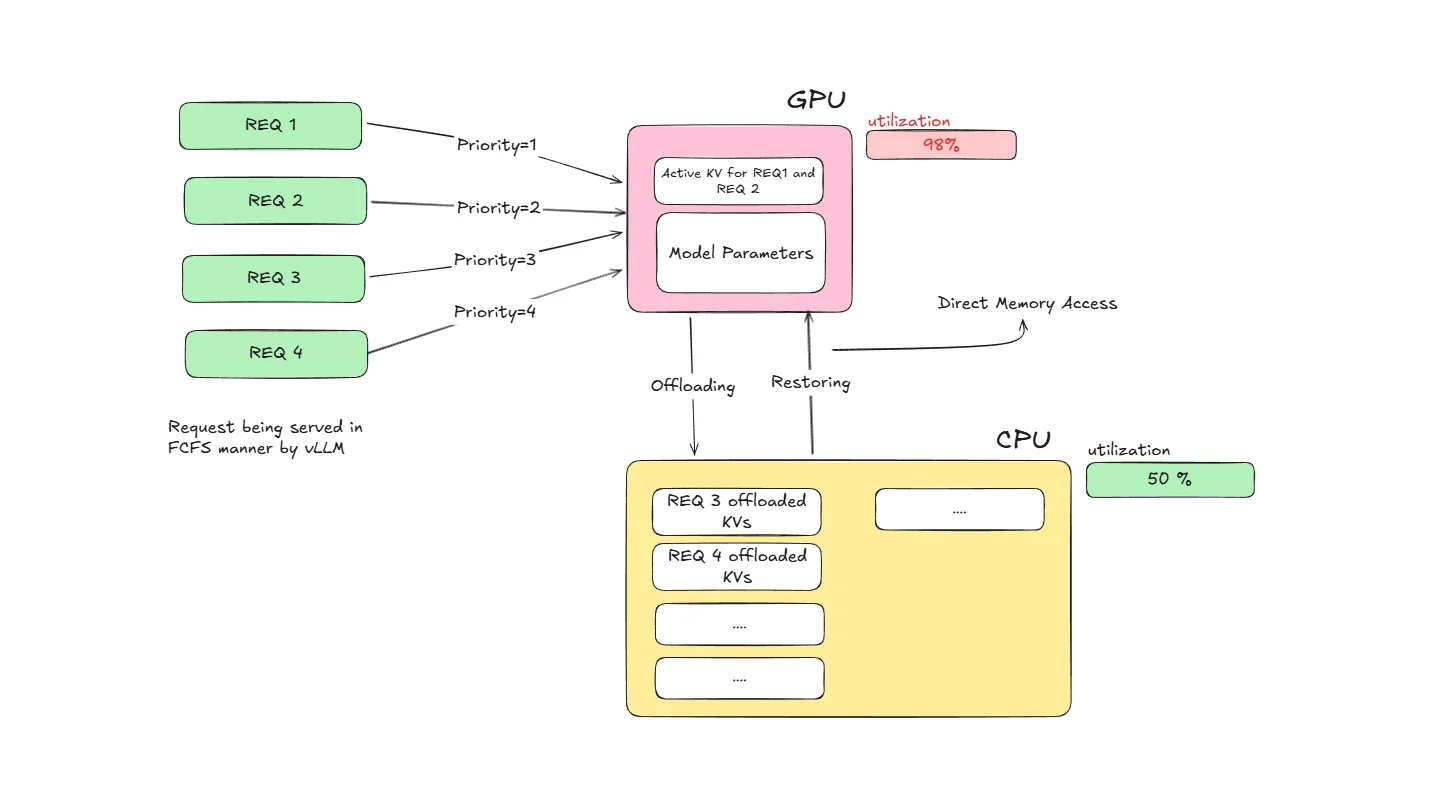
CPU offloading is a memory management technique that moves KV-cache data from GPU memory to CPU memory when GPU memory becomes scarce. This allows vLLM to handle longer sequences and larger batch sizes by utilizing the abundant CPU memory, even when GPU memory is limited.
Think of it as a smart storage system: when your GPU memory is full, the system automatically moves less critical KV-cache blocks to CPU memory, freeing up GPU space for active computations. This becomes particularly important in request preemption scenarios. Under memory pressure, vLLM's scheduler may preempt requests and offload their KV-cache blocks to CPU memory based on its preemption policy. This ensures the system can continue processing requests while preserving computation progress through intelligent memory management.
How Does It Work?
-
Memory Monitoring: vLLM continuously monitors GPU memory usage during inference
-
Selective Offloading: When GPU memory reaches capacity, vLLM's scheduler may preempt requests based on its preemption policy. Preempted requests have their KV-cache blocks offloaded to CPU memory. This offloading operation runs asynchronously in the background, allowing continuous system operation.
-
Smart Retrieval: When offloaded KV-cache blocks are needed, they're quickly moved back to GPU memory
-
Transparent Operation: The process is automatic and invisible to the user or application
Offloading Methods
Native CPU Offloading: vLLM's built-in CPU offloading uses optimized memory transfers and intelligent caching policies. It directly manages GPU-to-CPU memory movement using CUDA memory management APIs.
LMCache Integration: LMCache is an external caching system that can be integrated with vLLM for more sophisticated offloading strategies. It provides distributed caching capabilities across multiple machines and advanced eviction policies. LMCache supports various backends including Redis for fast in-memory distributed caching, disk storage for persistent local caching, S3 for cloud-based distributed storage, and distributed caching across cluster nodes.
Direct Memory Access (DMA) Optimization
CPU offloading leverages DMA transfers for efficient data movement:
- Bypasses CPU for memory transfers, reducing overhead
- Asynchronous operations allow computation to continue during transfers
- Batch transfers minimize PCIe transaction overhead
- Memory pinning ensures optimal transfer speeds between GPU and system memory
Memory Management Strategy
vLLM intelligently prioritizes memory usage across GPU and CPU based on current processing needs. GPU memory is reserved for the most critical components that require fast access, including active KV-cache blocks that are currently being computed, recently accessed KV-cache blocks that might be needed soon, and essential model parameters along with intermediate activations required for ongoing computations.
Meanwhile, CPU memory serves as intelligent storage for less immediately critical data. This includes older KV-cache blocks from earlier parts of long sequences that aren't currently needed, KV-cache blocks from requests that have been paused or moved to background processing, and cached blocks that haven't been accessed recently but still need to be preserved for potential future use. This strategic distribution ensures optimal performance while maximizing memory utilization across both processing units.
Real-World Performance Test
We conducted a comprehensive test to measure CPU offloading effectiveness using the Qwen3-32B model with mixed workload patterns.
Experimental Setup:
- Model: Qwen3-32B (32B parameter model)
- Test Scenario: High-concurrency environment with memory pressure simulation
- Dataset: ShareGPT
- Hardware: A100-80GB GPU with 512GB system RAM
Deployment Commands:
Without CPU offloading:
vllm serve Qwen/Qwen3-32B \
    --max-model-len 32768 \
    --gpu-memory-utilization 0.9
With CPU offloading enabled (using new CLI flags):
vllm serve Qwen/Qwen3-32B \
    --max-model-len 32768 \
    --gpu-memory-utilization 0.9 \
    --kv-offloading-backend native \
    --kv-offloading-size 8 \
    --disable-hybrid-kv-cache-manager
Key Arguments:
--kv-offloading-backend: Specifies the offloading backend. Usenativefor vLLM's built-in CPU offloading orlmcachefor LMCache integration.--kv-offloading-size: Size (in GB) of CPU memory to allocate for KV cache offloading.
Benchmarking:
vllm bench serve \
    --model Qwen/Qwen3-32B \
    --dataset-name sharegpt \
    --dataset-path ShareGPT_V3_unfiltered_cleaned_split.json \
    --max-concurrency 500 \
    --num-prompts 1000
Results:
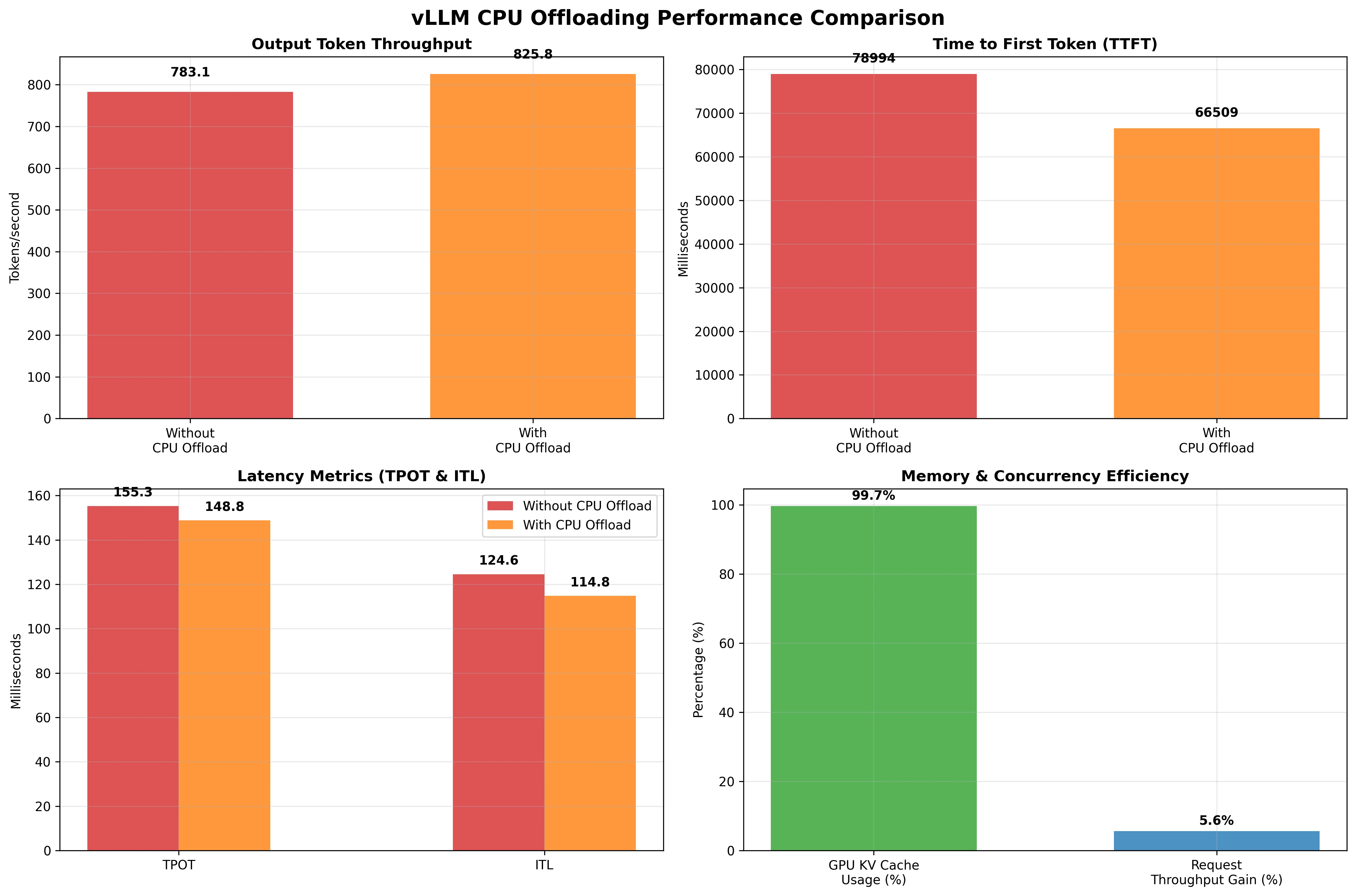
| Metric | Without CPU Offloading | With CPU Offloading | Change | Insight |
|---|---|---|---|---|
| Output Token Throughput (tok/s) | 783.09 | 825.77 | +5.4% | Modest improvement in generation speed |
| Mean TTFT (ms) | 78994.18 | 66508.99 | -15.8% | Faster time to first token |
| Mean TPOT (ms) | 155.28 | 148.79 | -4.2% | Slightly faster per-token generation |
| Mean ITL (ms) | 124.56 | 114.80 | -7.8% | Lower inter-token latency |
| GPU KV Cache Usage | 98.0% | 99.65% | +1.7% | Near-maximal GPU cache utilization |
| External prefix cache hit rate | NA | 0.6% | +0.6% | Low cache reuse opportunities |
Results Analysis
Detailed Performance Analysis:
The results demonstrate strategic improvements with CPU offloading enabled:
-
Output token throughput increased by 5.4% (from 783 to 826 tokens/second), providing modest but consistent performance gains while enabling better memory utilization.
-
Time to First Token (TTFT) improved by 15.8% (from 78.9 seconds to 66.5 seconds), significantly reducing user wait times and improving overall system responsiveness.
-
Time Per Output Token (TPOT) and Inter-Token Latency (ITL) improved by 4.2% and 7.8% respectively, showing consistent performance gains across all latency metrics.
-
GPU KV Cache utilization increased to 99.65%, demonstrating near-optimal memory usage and enabling the system to handle larger workloads within the same hardware constraints.
Disaggregated Prefill/Decode (Disaggregated P/D)
Disaggregated Prefill/Decode is an architectural optimization that separates the two main phases of LLM inference into different processing units or clusters. The prefill phase processes the entire input prompt to generate initial KV-cache, while the decode phase generates tokens one by one using the cached context.
This separation allows each phase to be optimized independently with specialized hardware configurations, improving overall system efficiency and resource utilization.
How Does It Work?
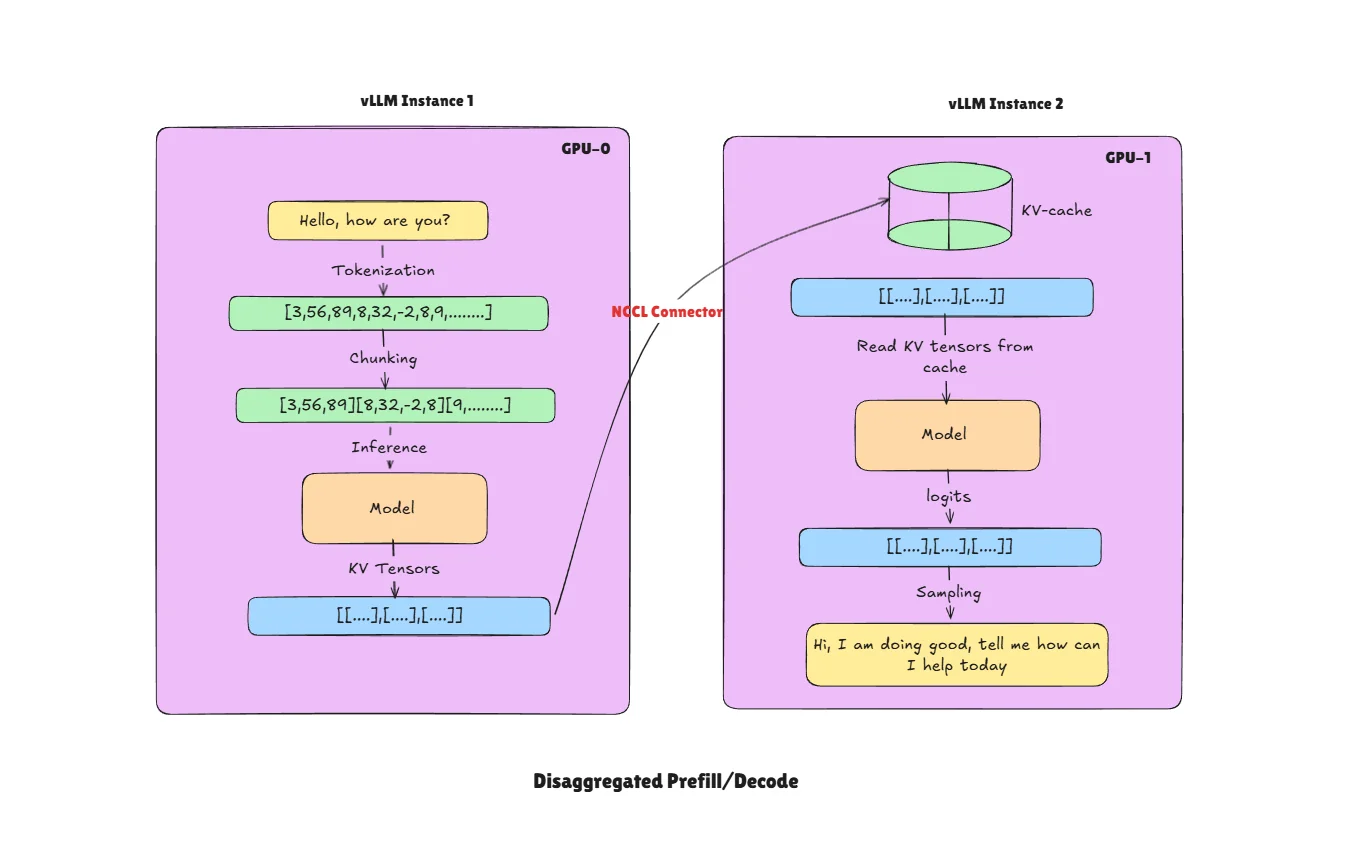
- Request Routing: Incoming requests are intelligently routed based on their processing phase.
- Prefill Instance (vLLM Instance 1): Dedicated instance optimized for high-throughput batch processing handles prompt prefill operations.
- Decode Instance (vLLM Instance 2): Specialized instance optimized for low-latency token generation handles the autoregressive decode phase.
- KV-Cache Transfer: After prefill completion, the generated KV-cache is transferred to decode instance using different connectors (e.g.,
P2pNcclConnector). - Token Generation: Decode instance continues generating tokens using the transferred KV-cache.
In the above diagram we show only two instances but there can be multiple like N for prefill and M for decode. Separating these two components makes scaling and optimization simple. In vLLM there are multiple connectors available for KV-cache transfer across GPUs.
Architecture Benefits
The disaggregated architecture allows each phase to be optimized for its specific computational characteristics. Prefill clusters are configured with high-memory, high-bandwidth setups that excel at large batch processing, enabling parallel computation across long sequences and handling multiple requests simultaneously during the prefill phase. In contrast, decode clusters use low-latency configurations specifically optimized for single-token generation, requiring smaller memory footprints per request while being optimized for sustained autoregressive generation. This specialization ensures that each phase operates with the most appropriate hardware configuration for its workload patterns.
Disaggregated P/D becomes particularly valuable for large-scale deployments with mixed workload patterns, scenarios where prefill and decode have different resource requirements, multi-tenant environments where workload isolation is important, and systems that need to optimize cost-performance ratios by using different hardware for different phases.
Performance Trade-offs
The main benefits include better resource utilization through specialized hardware configurations, improved cost efficiency by matching hardware to workload characteristics, enhanced scalability for different phases independently, and reduced contention between prefill and decode operations. However, this approach adds system complexity and requires managing KV-cache transfers between clusters, which can introduce some latency overhead.
Note: Disaggregated P/D is currently in experimental status within vLLM with implementation challenges including connector stability issues, configuration complexity, and limited production readiness. We tried implementing this on 2 A100 GPUs but encountered freezing issues after a couple of requests, confirming the experimental nature of this feature. Thorough testing is recommended before production deployment.
Practical Implementation with KV Transfer
For a complete disaggregated setup with KV transfer between instances:
Producer (Prefill Instance):
CUDA_VISIBLE_DEVICES=0 vllm serve Qwen/Qwen3-32B \
  --host 0.0.0.0 \
  --port 8100 \
  --max-model-len 512 \
  --gpu-memory-utilization 0.8 \
  --trust-remote-code \
  --kv-transfer-config '{
    "kv_connector":"P2pNcclConnector",
    "kv_role":"kv_producer",
    "kv_rank":0,
    "kv_parallel_size":2,
    "kv_buffer_size":"1e9",
    "kv_port":"14579",
    "kv_connector_extra_config":{
      "proxy_ip":"127.0.0.1",
      "http_ip":"127.0.0.1",
      "proxy_port":"30001",
      "http_port":"8100",
      "send_type":"PUT_ASYNC"
    }
  }'
Consumer (Decode Instance):
CUDA_VISIBLE_DEVICES=1 vllm serve Qwen/Qwen3-32B \
  --host 0.0.0.0 \
  --port 8200 \
  --max-model-len 512 \
  --gpu-memory-utilization 0.8 \
  --trust-remote-code \
  --kv-transfer-config '{
    "kv_connector":"P2pNcclConnector",
    "kv_role":"kv_consumer",
    "kv_rank":1,
    "kv_parallel_size":2,
    "kv_buffer_size":"1e10",
    "kv_port":"14580",
    "kv_connector_extra_config":{
      "proxy_ip":"127.0.0.1",
      "http_ip":"127.0.0.1",
      "proxy_port":"30001",
      "http_port":"8200",
      "send_type":"PUT_ASYNC",
      "nccl_num_channels":"16"
    }
  }'
Key Argument (--kv-transfer-config):
kv_connector: The connector type for KV transfer.P2pNcclConnectoruses NCCL for efficient GPU-to-GPU transfer.kv_role: Role of this instance —kv_producer(prefill) orkv_consumer(decode).kv_rank/kv_parallel_size: Rank of this instance and total number of instances in the disaggregated setup.kv_buffer_size: Buffer size for KV transfer (in bytes, scientific notation supported).kv_connector_extra_config: Additional settings including proxy addresses andsend_type(e.g.,PUT_ASYNCfor asynchronous transfers).
Proxy Server:
The proxy server is part of the vLLM disaggregated serving examples. Run the proxy script from the vLLM examples:
python disagg_prefill_proxy_server.py
Link to vllm github repo to download proxy file here
Benchmark Client:
vllm bench serve \
  --model Qwen/Qwen3-32B \
  --port 8000 \
  --host 127.0.0.1 \
  --endpoint /v1/completions \
  --dataset-name sharegpt \
  --dataset-path ShareGPT_V3_unfiltered_cleaned_split.json \
  --max-concurrency 10 \
  --num-prompts 1000
Setup Files: Download the complete setup from the vLLM disaggregated prefill online serving example.
Ready to start building?
Get a GPU instance running in 90 seconds. JupyterLab, VS Code, or SSH. Per-minute billing so you only pay for what you use.
Try Jarvislabs FreeZero Reload Sleep Mode
Zero Reload Sleep Mode is an intelligent model lifecycle management feature that keeps the server process and CUDA state alive while releasing most GPU memory during idle periods. This avoids the expensive model initialization process when new requests arrive. Instead of completely shutting down inactive model servers, vLLM preserves the initialized CUDA context, compiled kernels, and CUDA graphs—allowing rapid reactivation without a full cold start.
This optimization is particularly valuable in scenarios with intermittent workloads where models experience periods of inactivity followed by sudden demand spikes. Think of it like putting your computer to sleep instead of shutting it down completely—you release most resources while maintaining the ability to resume quickly.
Cold Start vs Sleep Mode
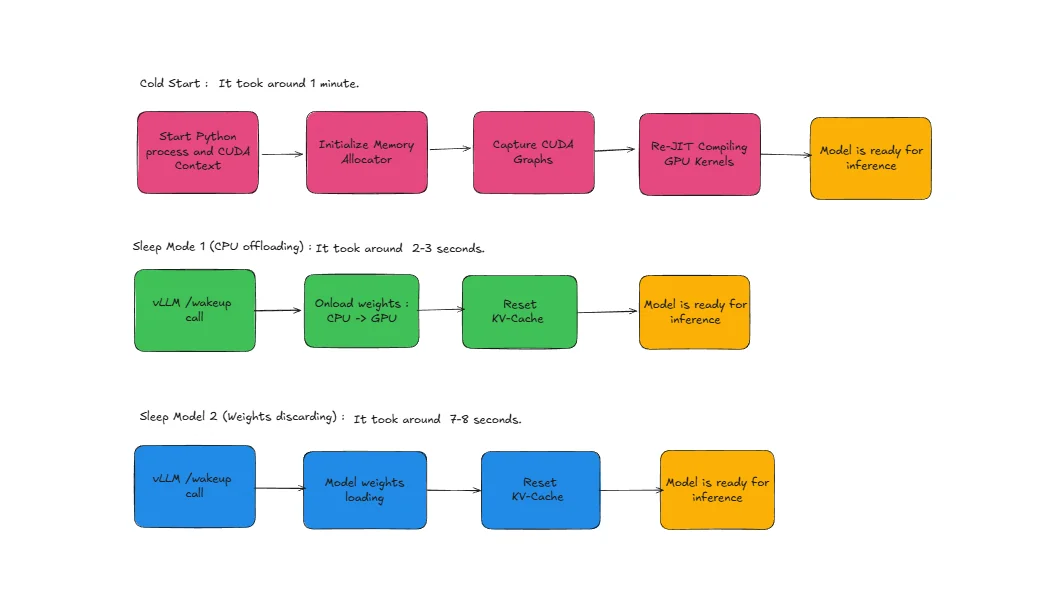
Cold Start Process (Without Sleep Mode): When a model needs to be loaded from scratch, vLLM must go through several time-consuming steps:
- Start Python Process and CUDA Context: Initialize the Python runtime environment and establish CUDA context for GPU communication
- Initialize Memory Allocator: Set up GPU memory management systems and allocate initial memory pools
- Capture CUDA Graphs: Record and optimize GPU execution patterns for the specific model architecture
- Re-JIT Compiling GPU Kernels: Compile optimized GPU kernels specific to the model and hardware configuration
This entire process can take several seconds to minutes depending on model size and system configuration.
Sleep Mode Advantage: With Zero Reload Sleep Mode, vLLM bypasses these expensive initialization steps because the model maintains its initialized state in memory. The Python process remains active, CUDA context stays established, memory allocators are already configured, CUDA graphs remain captured, and compiled kernels stay in cache, enabling instant model activation. We observed that on an A100-80GB machine Qwen3-32B and Qwen3-8B take almost the same time for cold start, around 1 minute, while the same models take 7-8 seconds using Sleep mode L2 and 2-3 seconds using Sleep mode L1.
vLLM Sleep Levels
L1 Sleep (Light Sleep): In L1 sleep, the model offloads weights from GPU to CPU memory while retaining CUDA graphs, compiled kernels, and other GPU state. The model weights are moved to CPU memory but remain readily accessible. Important: The KV cache is discarded (not preserved) during L1 sleep. Wake-up time is around 2-3 seconds as weights need to be transferred back from CPU to GPU memory. After waking, the first request will rebuild the KV cache through prefill.
L2 Sleep (Deep Sleep):
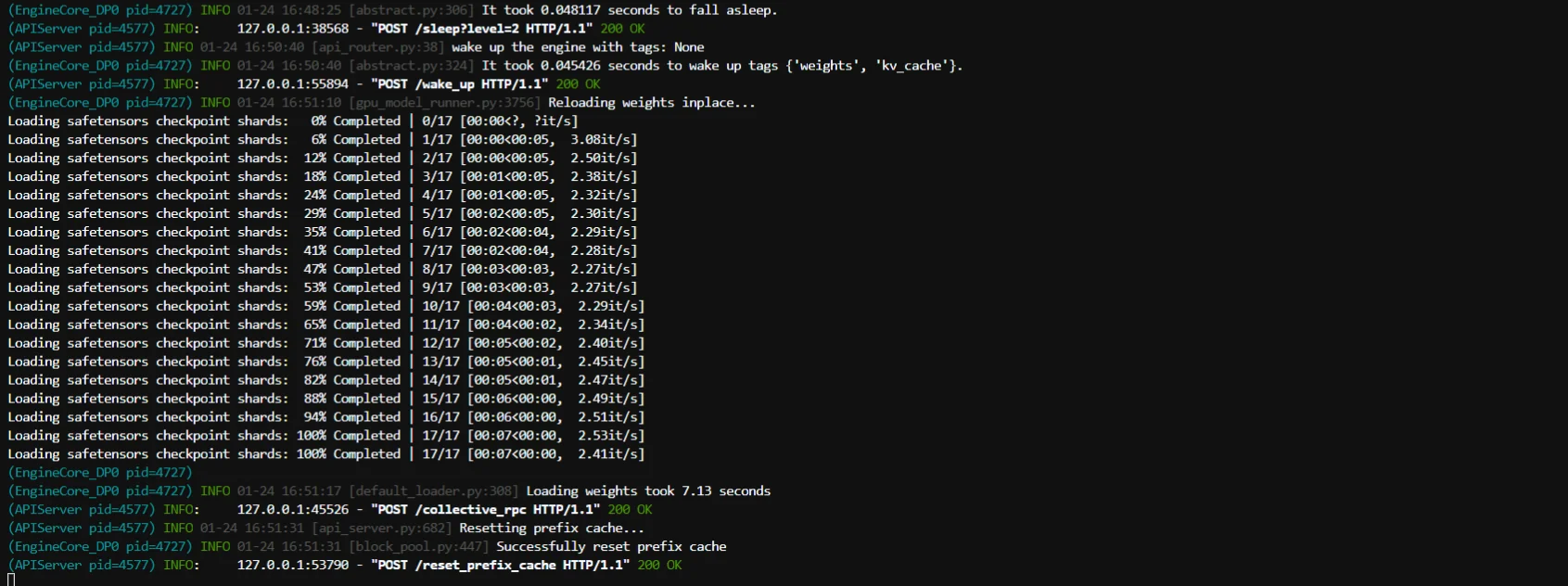
L2 sleep completely discards both the model weights and KV cache from GPU memory. Weights must be reloaded from disk storage when the model wakes up. However, it still preserves CUDA graphs, compiled kernels, and other initialization state. Wake-up time is around 7-8 seconds as weights must be loaded from disk and transferred to GPU, but this is still much faster than a full cold start which takes around 1 minute. For L2 wake-up, you must explicitly call reload_weights via /collective_rpc and then /reset_prefix_cache.
How Does It Work?
Practical Workflow Example
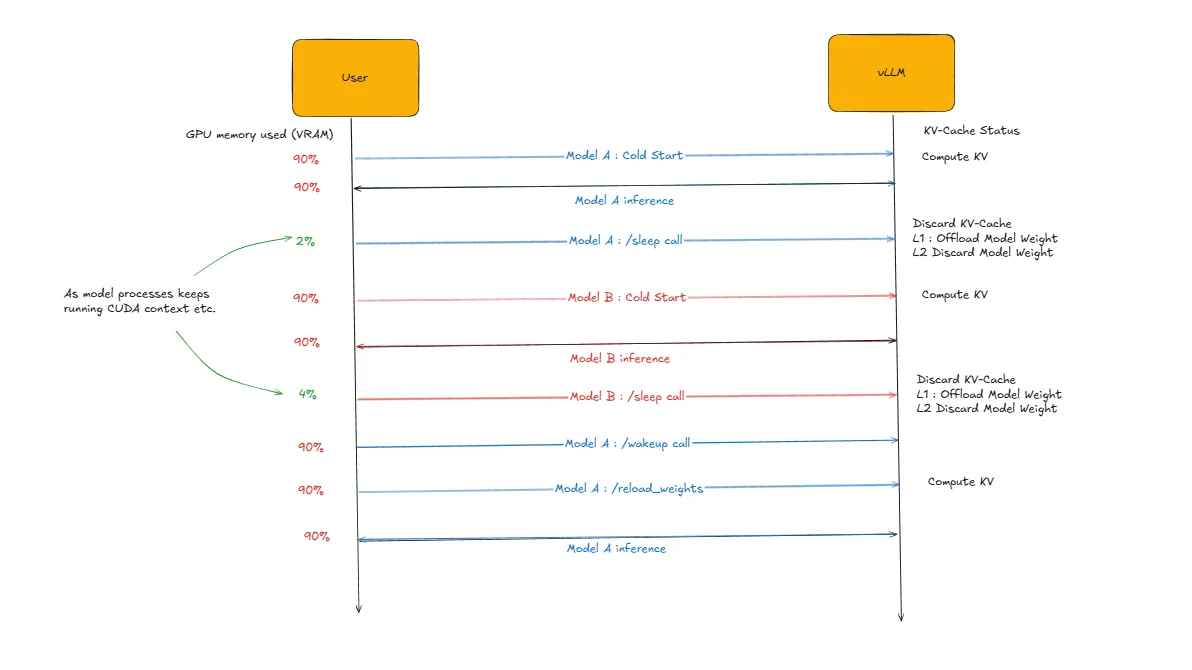
The diagram above illustrates sleep mode functionality using two models: Model A (Qwen3-32B) and Model B (Qwen3-8B) running on the same GPU. The workflow demonstrates efficient model switching through sleep mode management.
Step-by-Step Process:
- Initialize Model A: Perform cold start of Qwen3-32B (takes ~1 minute)
- Run Inference: Execute inference requests on Model A
- Sleep Model A: Put Model A to sleep using
/sleependpoint (online mode) orllm.sleep()method (offline mode) - Initialize Model B: Perform cold start of Qwen3-8B while Model A sleeps
- Run Inference: Execute inference requests on Model B
- Sleep Model B: Put Model B to sleep using the same sleep commands
- Wake Model A: Reactivate Model A using
/wake_upendpoint (online mode) orllm.wake_up()method (offline mode). For L2, also call/collective_rpcwithreload_weightsand then/reset_prefix_cache. - Continue Inference: Resume inference on Model A (takes 2-3 seconds for L1 or 7-8 seconds for L2). Note that the KV cache was discarded during sleep, so the first request will rebuild it through prefill.
This approach enables efficient model switching on the same GPU, where vLLM automatically handles weight offloading (L1 sleep) or weight discarding (L2 sleep) based on the configured sleep level, allowing multiple models to share GPU resources without the overhead of repeated cold starts.
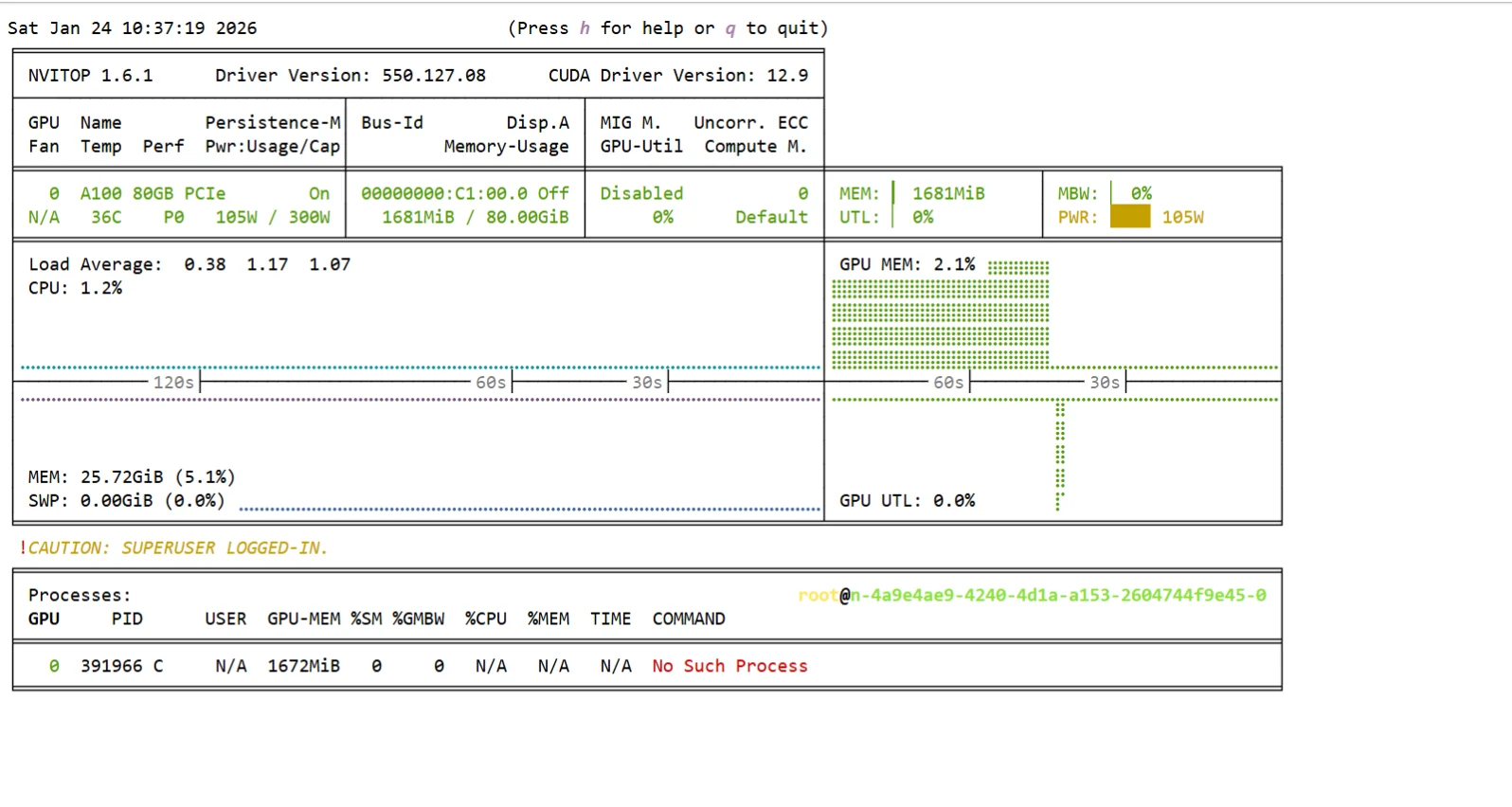
Here are the screenshots of GPU usage and server-side logs when I perform L2 sleep implementation in online mode.
export VLLM_SERVER_DEV_MODE=1
Step 1: Qwen3-32B cold start
vllm serve Qwen/Qwen3-32B \
    --enable-sleep-mode \
    --max-model-len 512
Key Argument:
--enable-sleep-mode: Enables sleep mode functionality.
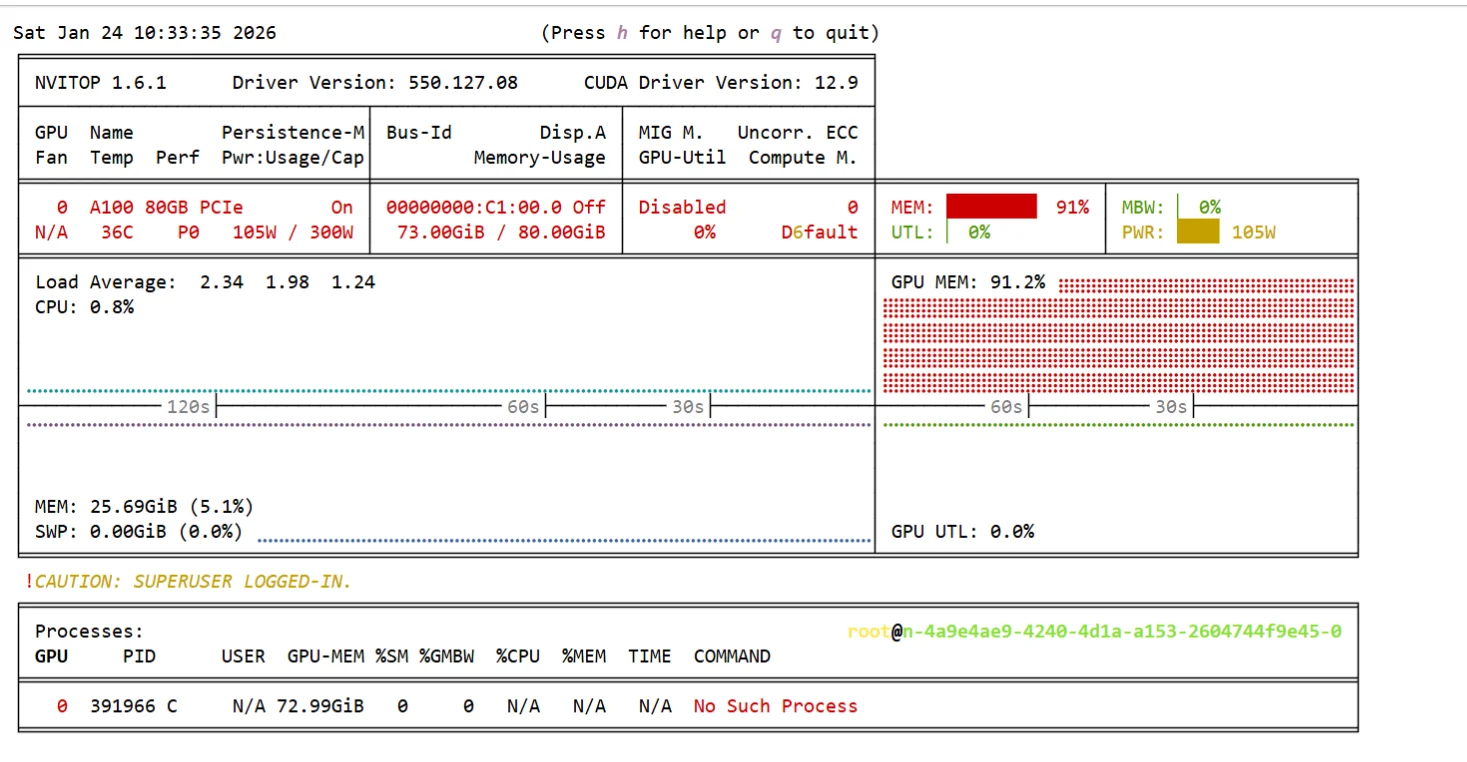
Step 2: Put Qwen3-32B to sleep L2
curl -X POST 'localhost:8001/sleep?level=2'

Step 3: Qwen3-8B cold start
vllm serve Qwen/Qwen3-8B \
    --enable-sleep-mode --port 8002 \
    --max-model-len 512
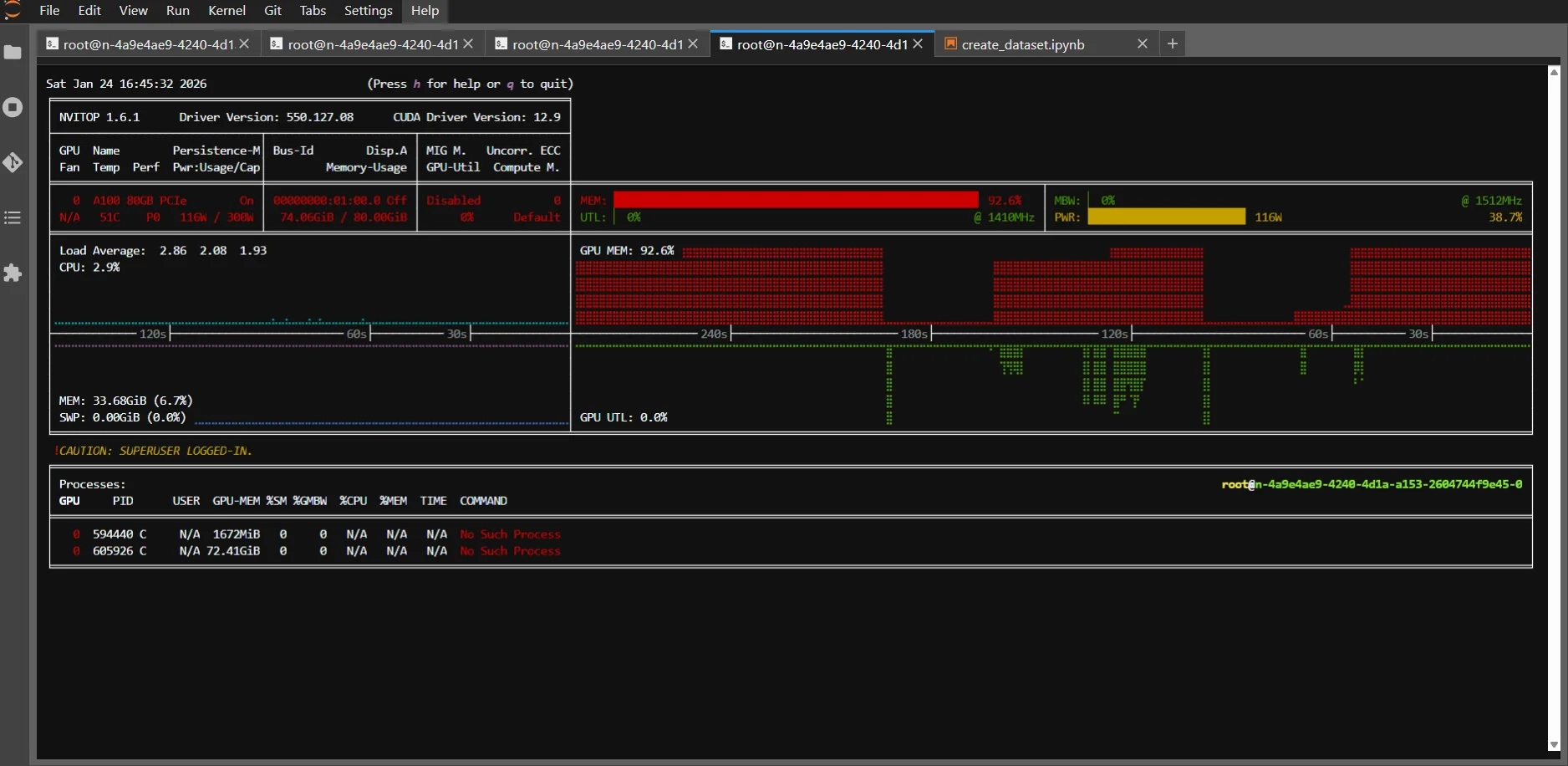
Step 4: Put Qwen3-8B to sleep L2
curl -X POST 'localhost:8002/sleep?level=2'
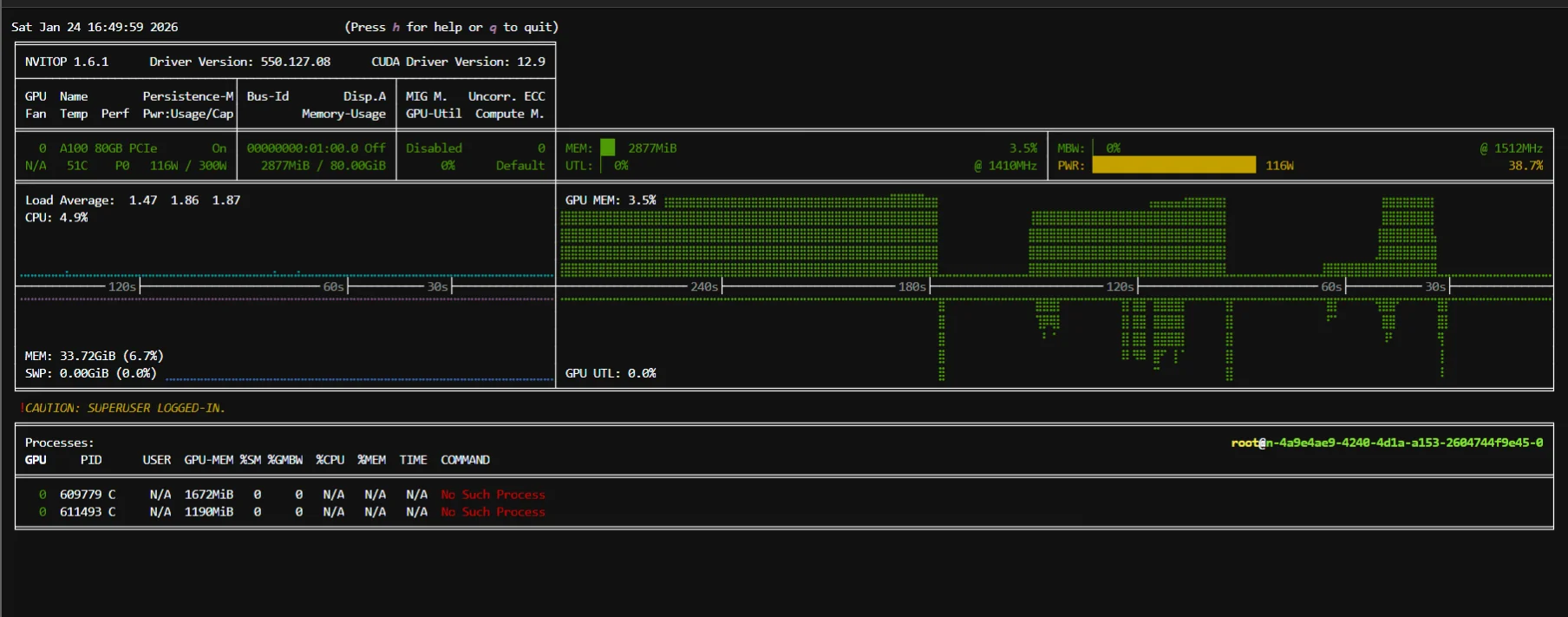
Step 5: Wake up Qwen3-32B from sleep
curl -X POST 'localhost:8001/wake_up'
curl -X POST 'localhost:8001/collective_rpc' \
    -H 'Content-Type: application/json' \
    -d '{"method":"reload_weights"}'
curl -X POST 'localhost:8001/reset_prefix_cache'
Memory Management in Sleep Mode
vLLM's sleep mode intelligently manages memory based on the selected sleep level. In both L1 and L2 sleep, the KV cache is discarded—it is not offloaded or preserved. In L1 sleep, model weights are offloaded to CPU memory while CUDA graphs, compiled kernels, and GPU state remain active, allowing quick wake-up by transferring weights back to GPU. In L2 sleep, model weights are completely discarded from GPU memory, requiring reload from disk storage, but essential GPU initialization state like CUDA graphs and kernels are preserved to avoid full cold start overhead. After waking from either sleep level, the KV cache will be rebuilt through prefill on the first request.
When Is It Most Useful?
Zero Reload Sleep Mode becomes essential for multi-tenant environments where different users access different models sporadically, API services with bursty traffic patterns where demand varies throughout the day, development and testing environments where models are used intermittently, and cost-sensitive deployments where keeping models loaded 24/7 isn't economical but reload latency is unacceptable.
The primary benefits include elimination of model reload latency for frequently accessed models, reduced cold start delays improving user experience, better resource utilization across multiple models, and optimal balance between memory usage and responsiveness. However, there are considerations including continued memory consumption during idle periods (CPU memory for L1, disk I/O for L2), potential resource fragmentation from managing multiple model states, and increased complexity in memory management policies.
Conclusion
These five optimization techniques can significantly improve your vLLM inference performance, and the best part is you don't need to implement all of them at once. Start with what makes sense for your specific use case.
If you're dealing with repetitive prompts or system messages, prefix caching will give you immediate wins with minimal effort. For memory-constrained environments, FP8 KV-Cache can help you squeeze more performance out of your existing hardware. When you need to handle long contexts or high concurrency that exceeds your GPU's KV-cache capacity, CPU offloading can help manage that memory pressure (note: if model weights don't fit on GPU, you'll need other strategies like tensor parallelism or pipeline parallelism or weight quantization).
Disaggregated P/D shows promise for large-scale deployments, but it's still experimental and comes with complexity that might not be worth it for smaller setups. Zero Reload Sleep Mode is fantastic for environments where you're switching between multiple models or have intermittent workloads.
The key is understanding your bottlenecks first. Are you running out of memory? Is latency your main concern? Do you have predictable traffic patterns? Answer these questions, then choose the optimizations that directly address your pain points.
As vLLM continues evolving, these techniques will become more stable and easier to implement. But even today, picking the right combination for your setup can make the difference between a sluggish inference system and one that scales beautifully with your needs.
References
- vLLM Official Documentation
- Automatic Prefix Caching
- Quantized KV Cache
- CPU Offloading KV Cache Tutorial
- Disaggregated Prefill/Decode
- Inside vLLM
- Qwen3-32B Model
- ShareGPT Datasets
- ShareGPT V3 Unfiltered Dataset
- vLLM Quantization Complete Guide
- vLLM Sleep Mode Blog
- vLLM GitHub Repository - Online Serving Examples
- JarvisLabs - GPU Cloud Platform
Ready to start building?
Get a GPU instance running in 90 seconds. JupyterLab, VS Code, or SSH. Per-minute billing so you only pay for what you use.
Try Jarvislabs Free