Scaling LLM Inference: Data, Pipeline & Tensor Parallelism in vLLM

Introduction
When you chat with ChatGPT or Claude, you're interacting with models that have hundreds of billions to trillions of parameters. These models are so large that they simply cannot fit on a single GPU.
Consider this: an NVIDIA H100 has 80GB of memory. A 70B parameter model in FP16 needs ~140GB just for weights that's nearly 2 H100s worth of memory, and we haven't even counted the KV cache for storing conversation context. For trillion-parameter models like those powering ChatGPT and Claude, you'd need dozens of GPUs just to hold the weights.
This is where distributed inference comes in — a core challenge in distributed machine learning. Instead of running the entire model on one GPU, we spread the work across multiple GPUs for multi-GPU AI inference at scale. But how exactly do we split a model? There are several strategies — all forms of model parallelism — each with different trade-offs:
Parallelism Strategies Overview
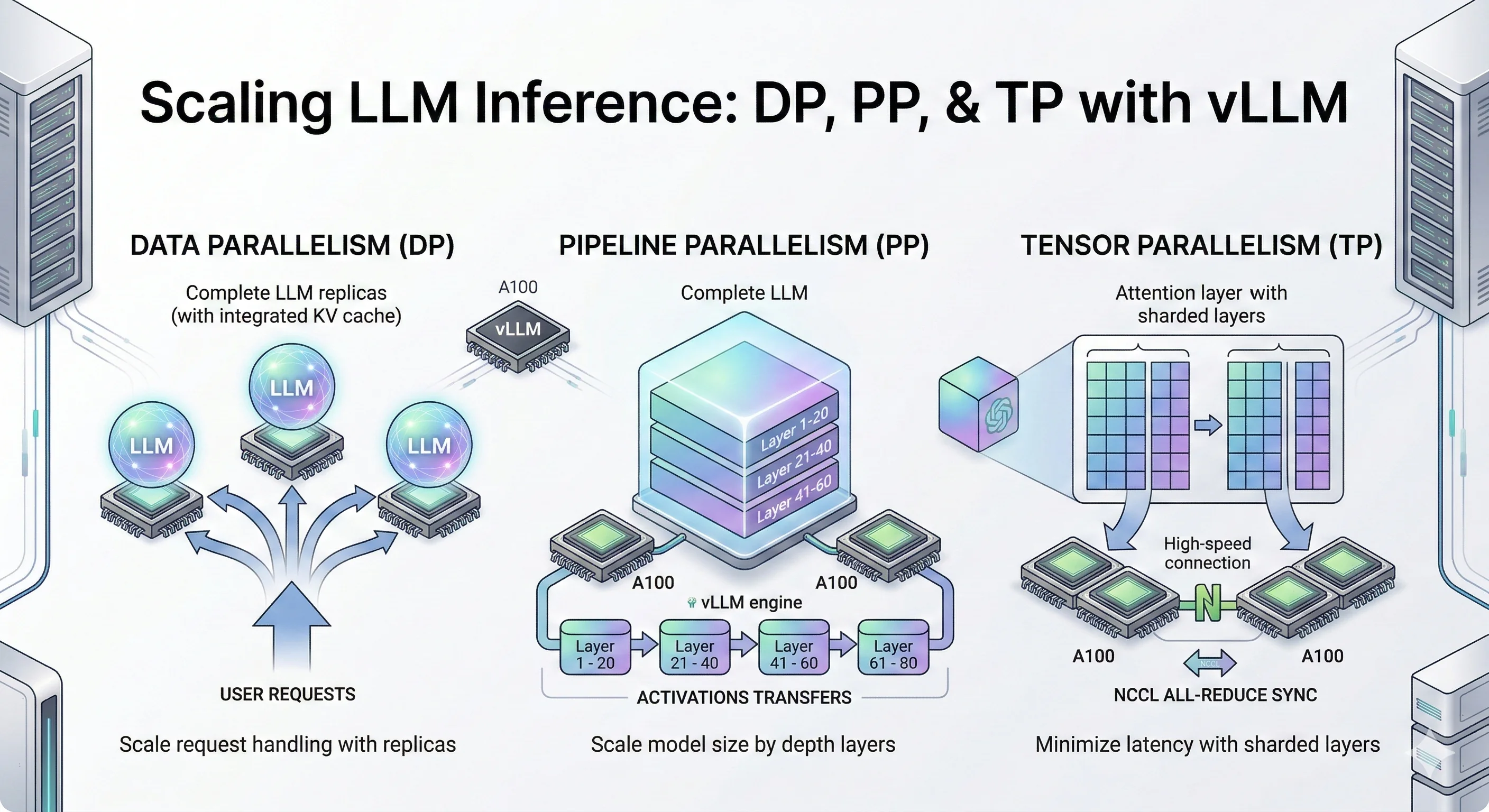
- Data Parallelism (DP), also called data-level parallelism: Make copies of the entire model on multiple GPUs. Each GPU handles different user requests. Simple and effective when your model fits on one GPU but you need more throughput.
- Pipeline Parallelism (PP): Slice the model by layers. GPU 0 runs layers 1-10, GPU 1 runs layers 11-20, and so on. Data flows through GPUs like an assembly line.
- Tensor Parallelism (TP): Split each layer's matrix operations across GPUs. All GPUs work together on the same request, synchronizing after each layer. Best for low latency when you have fast GPU interconnects.
- Expert Parallelism (EP): For Mixture-of-Experts models (like Mixtral), each GPU holds different "expert" sub-networks. Tokens get routed to the right expert. Also called vLLM expert parallelism in the context of vLLM's MoE support.
- Context Parallelism (CP): Split long sequences across GPUs. Each GPU handles a portion of the context, useful for very long prompts.
In this blog, we dive deep into three core LLM inference techniques: Data Parallelism (DP), Pipeline Parallelism (PP), and Tensor Parallelism (TP). These are the foundational LLM inference optimization strategies for vLLM distributed inference and distributed LLM serving that you'll encounter in most LLM serving systems like vLLM, TensorRT-LLM, and SGLang.
We'll cover Expert Parallelism (EP) and Context Parallelism (CP) in future blog posts, along with multi-node distributed inference across machines.
While trillion-parameter models require massive GPU clusters to run, the same parallelism techniques apply to smaller models too. For our experiments, we use Qwen3-32B and Qwen3-14B models small enough to benchmark on a few GPUs, but large enough to demonstrate the real trade-offs between DP, PP, and TP.
Think of these experiments as a scaled-down version of what happens at major AI labs. The principles are identical: when you understand how DP, PP, and TP behave on a 14B/32B model, you understand how they'll behave on a trillion-parameter model just with bigger numbers.
Let's deep dive into each technique.
Key Findings
- Data Parallelism (DP) scales throughput by ~50% at moderate concurrency (c=120–180) with no inter-GPU communication — the simplest LLM optimization for scaling model inference.
- Pipeline Parallelism (PP) enables serving models that don't fit on a single GPU, cutting TTFT P99 by 2.5–3× at high concurrency through larger aggregate KV cache.
- Tensor Parallelism (TP) delivers the best latency across all metrics simultaneously — 3× TTFT improvement, consistent TPOT and ITL gains — but requires fast GPU interconnects (NVLink).
- The key mental model: If you are limited by request volume, use DP. If you are limited by GPU memory, use PP. If you are limited by compute speed and latency, use TP.