The Complete Guide to LLM Quantization with vLLM: Benchmarks & Best Practices
· 47 min read

Introduction
If you've worked with large language models, you've probably run into a common problem: these models are huge and need a lot of GPU memory to run. A 32B parameter model can easily eat up 60+ GB of memory in its default form. That's where quantization comes in.
What is quantization? Simply put, it's the process of reducing the precision of model weights. Instead of storing each weight as a 16-bit floating point number, we can store it as a 4-bit or 8-bit integer. This makes the model smaller and faster to run.
In this blog post, we are going to:
- Learn about different quantization techniques available in vLLM
- See how each one works under the hood
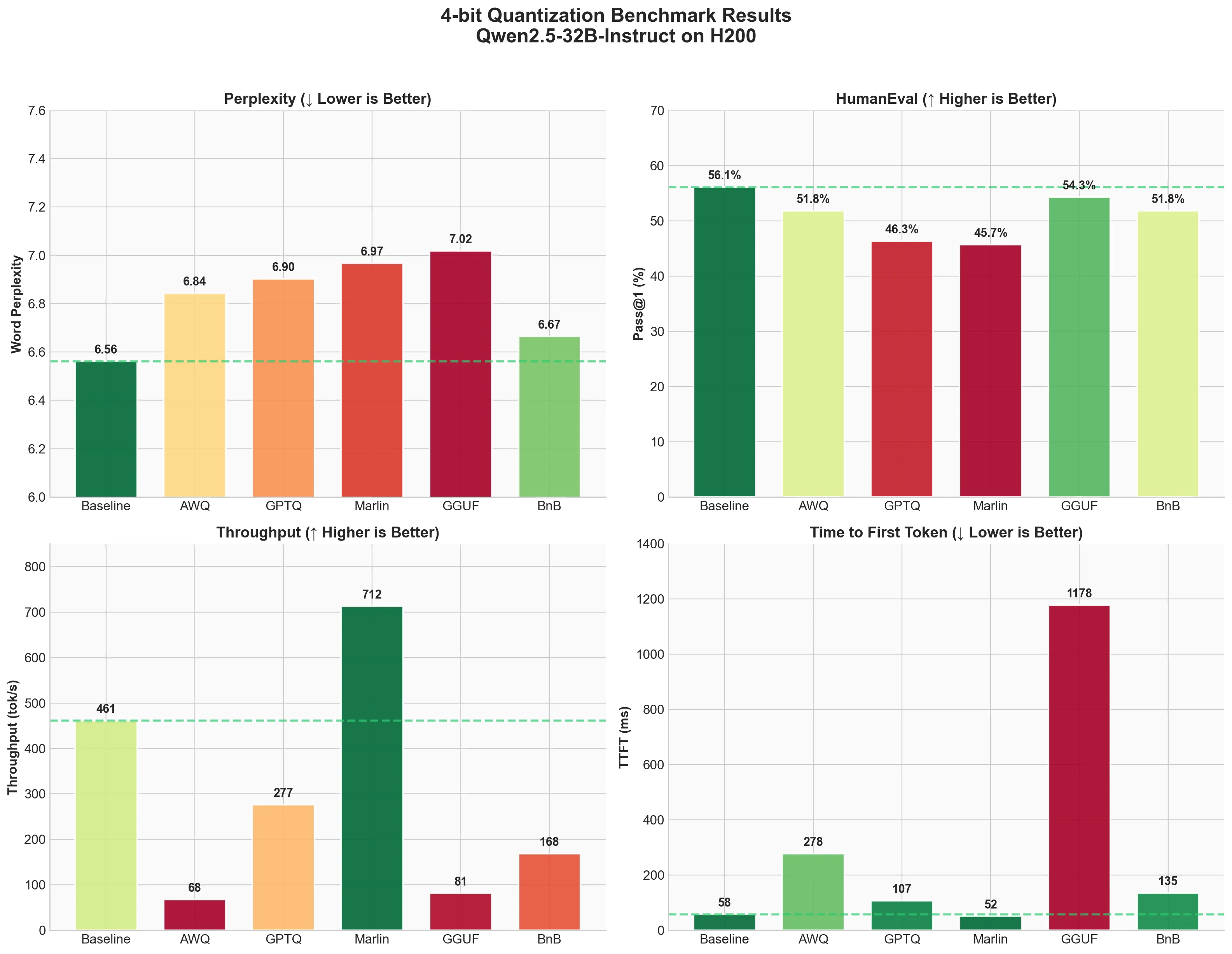
- Run actual benchmarks on an H200 GPU using Qwen2.5-32B-Instruct
- Help you decide which technique to use for your use case
The techniques we'll cover include AWQ, GPTQ, Marlin, BitBLAS, GGUF, BitsandBytes, and more. We'll test 4-bit quantization and measure three things:
- perplexity (model quality),
- code generation accuracy (HumanEval),
- and inference speed (ShareGPT benchmark).
Let's get started.