Deploying MiniMax M2.1 with vLLM: Complete Guide for Agentic Workloads

If you're building agentic applications or coding assistants, you've probably noticed that most open-source models fall short on tool calling and multi-step reasoning. MiniMax M2.1 changes that. Released on December 23, 2025, it's currently the strongest open-source model for agentic workloads, matching or beating Claude Sonnet on benchmarks like tau2-Bench, BrowseComp, and GAIA.
What makes M2.1 practical to deploy is its architecture. It's a Mixture-of-Experts model with 230 billion total parameters, but only 10 billion activate per forward pass. You get frontier-class performance on tool calling and software engineering tasks while running inference at a fraction of the compute. The model is MIT-licensed and works out of the box with Cline, Roo Code, OpenCode, and Claude Code.
This guide covers vLLM deployment, benchmarking, tool calling with M2.1's interleaved thinking feature, and integration with coding terminals.
Model specifications
| Specification | Value |
|---|---|
| Model ID | MiniMaxAI/MiniMax-M2.1 |
| Total parameters | 230B |
| Active parameters | 10B (MoE) |
| Context window | 204,800 tokens |
| Max output | 131,072 tokens |
| Precision | FP8 |
| License | Modified MIT |
| Weights | https://huggingface.co/MiniMaxAI/MiniMax-M2.1 |
Like M2, the weights are released in FP8 precision. This cuts memory footprint roughly in half compared to FP16 while maintaining output quality, making the 230B parameter model practical to serve on 4x 80GB GPUs.
Key capabilities
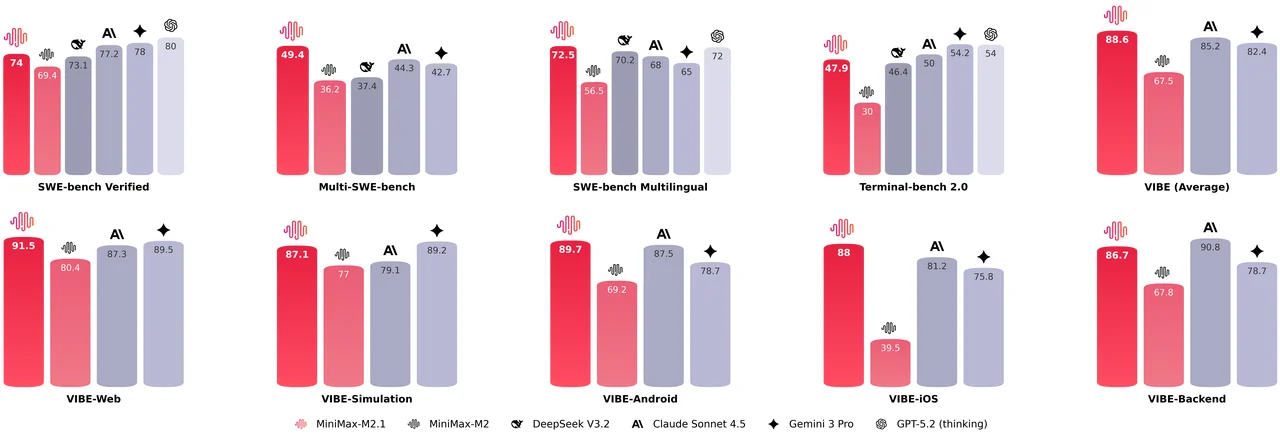
Multi-language programming. Most models optimize heavily for Python, but real-world systems involve multiple languages. M2.1 has systematic improvements for Rust, Java, Golang, C++, Kotlin, Objective-C, TypeScript, and JavaScript. The SWE-bench Multilingual score jumped from 56.5% to 72.5%, ahead of Claude Sonnet 4.5's 68%.
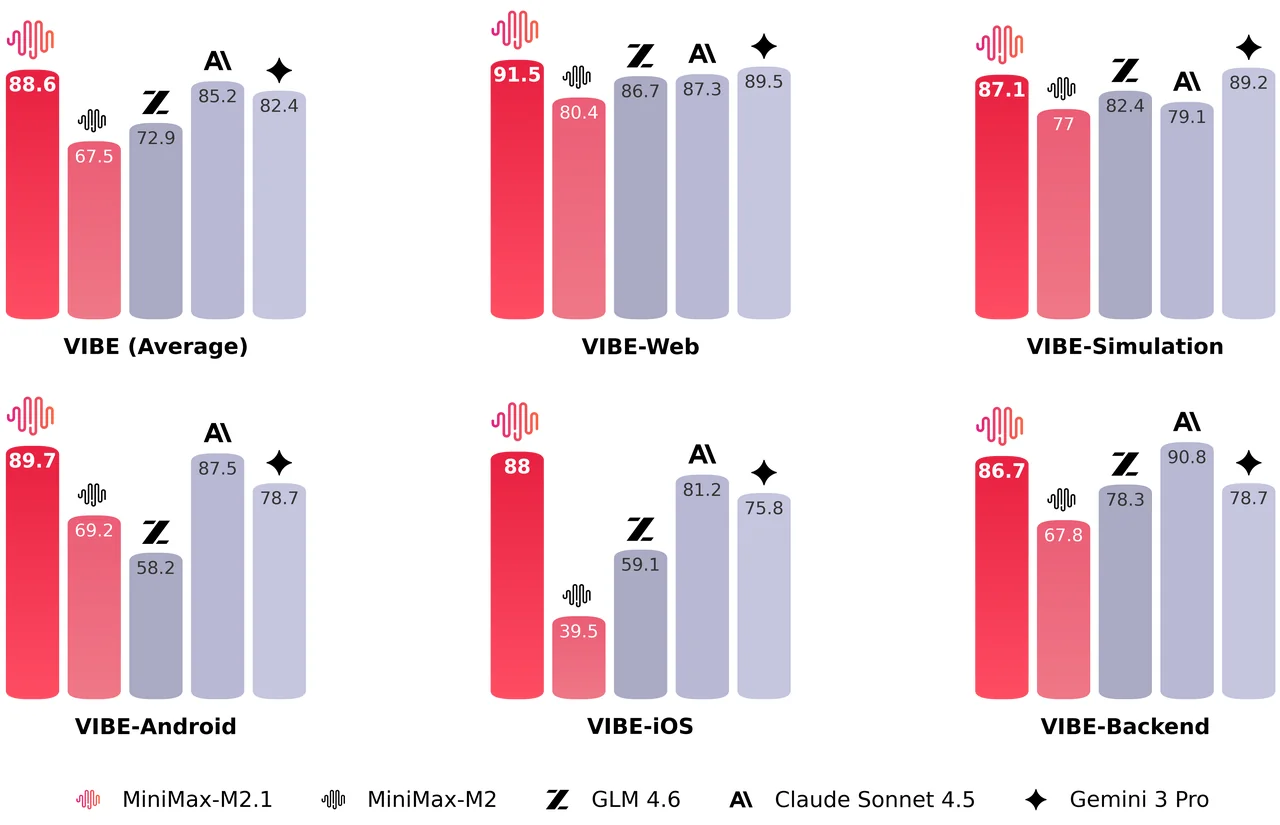
Mobile and web development. M2.1 scores 89.7% on VIBE-Android and 91.5% on VIBE-Web, with an aggregate VIBE score of 88.6%. VIBE is MiniMax's benchmark for evaluating end-to-end app generation in a real runtime environment. The model handles complex interactions, 3D visualizations, and what MiniMax calls "vibe coding" where design aesthetics matter.
Agent framework compatibility. M2.1 works consistently across Claude Code, Cline, Kilo Code, Roo Code, Droid (Factory AI), and BlackBox. It supports context management mechanisms like Skill.md, Claude.md/agent.md, cursorrule, and slash commands out of the box.
Interleaved thinking. The M2 series was one of the first open-source model families to systematically implement interleaved thinking, where the model generates <think> reasoning blocks before tool calls. This improves multi-step problem solving and provides transparency into the model's decision process. M2.1 further enhances this capability.
Conciseness. M2 was more verbose. M2.1 delivers more concise responses and faster generation, though MiniMax hasn't published specific reduction metrics.
Ready to start building?
Get a GPU instance running in 90 seconds. JupyterLab, VS Code, or SSH. Per-minute billing so you only pay for what you use.
Try Jarvislabs FreeBenchmarks
M2.1 shows strong improvements over M2 across software engineering benchmarks. It leads on Multi-SWE-Bench (49.4% vs Claude Sonnet 4.5's 44.3%) and SWE-bench Multilingual (72.5% vs Claude's 68%).
 Source: MiniMax M2.1 announcement
MiniMax also introduced VIBE (Visual & Interactive Benchmark for Execution), a benchmark for evaluating end-to-end app generation. Unlike traditional benchmarks that check code correctness, VIBE uses an Agent-as-a-Verifier approach to assess whether generated applications actually work in a real runtime environment. M2.1 scores 91.5% on VIBE-Web and 89.7% on VIBE-Android.
 Source: MiniMax M2.1 announcement
The takeaway: M2.1 delivers Claude Sonnet 4.5-level performance at roughly 10% of the cost. For an open-weight model you can self-host, that's remarkable.
vLLM deployment
vLLM is the most popular open-source serving framework for large language models, and it has first-class support for MiniMax M2.1. The model weights take roughly 220GB in FP8, so you'll need a multi-GPU setup.
Hardware requirements
Memory planning is straightforward: budget around 220GB for the model weights, plus roughly 240GB of KV cache per million context tokens. That math drives the GPU configurations:
| Configuration | Max Context | Use Case |
|---|---|---|
| 4x A100/A800 (80GB) | ~400K tokens | Standard deployments |
| 4x H200/H20 (96GB+) | ~400K tokens | Standard deployments |
| 8x H200 (141GB) | ~3M tokens | Extended context workloads |
For most coding and agentic tasks, 4 GPUs with 80-96GB each handles the 200K context window comfortably. You only need the 8-GPU setup if you're pushing into the multi-million token extended context range.
Installation
M2.1 requires the vLLM nightly build. The stable release doesn't include the MiniMax tool call parser yet:
uv venv
source .venv/bin/activate
uv pip install -U vllm --extra-index-url https://wheels.vllm.ai/nightly
Serving the model
For a standard 4-GPU setup with tensor parallelism:
SAFETENSORS_FAST_GPU=1 vllm serve MiniMaxAI/MiniMax-M2.1 \
    --trust-remote-code \
    --tensor-parallel-size 4 \
    --enable-auto-tool-choice \
    --tool-call-parser minimax_m2 \
    --reasoning-parser minimax_m2_append_think
SAFETENSORS_FAST_GPU=1 enables safetensors' fast GPU loading path, reducing weight load time by avoiding extra CPU staging when loading tensors onto GPU. --tool-call-parser minimax_m2 converts MiniMax's tag-based tool-call format (e.g., <invoke name=...><parameter ...>...) into OpenAI-compatible tool_calls. --reasoning-parser minimax_m2_append_think enables vLLM's reasoning extraction: for MiniMax M2 outputs, vLLM treats everything before </think> as reasoning and returns it in a dedicated reasoning field.
If you encounter torch.AcceleratorError: CUDA error: an illegal memory access was encountered, you can add --compilation-config "{\"cudagraph_mode\": \"PIECEWISE\"}" to the startup parameters to resolve this issue (from the official vLLM recipe)
If you encounter RuntimeError: PyTorch is checking whether allow_tf32_new is enabled for cuBlas matmul with PyTorch 2.9+, add VLLM_FLOAT32_MATMUL_PRECISION="tf32" to your environment variables to resolve this:
VLLM_FLOAT32_MATMUL_PRECISION="tf32" SAFETENSORS_FAST_GPU=1 vllm serve \
    MiniMaxAI/MiniMax-M2.1 --trust-remote-code \
    --tensor-parallel-size 4 \
    --enable-auto-tool-choice --tool-call-parser minimax_m2 \
    --compilation-config "{\"cudagraph_mode\": \"PIECEWISE\"}"
Scaling to 8 GPUs
For 8-GPU deployments, MiniMax recommends using data parallelism combined with expert parallelism (DP+EP) rather than pure tensor parallelism. This approach is better suited to M2.1's MoE architecture.
A quick primer on the parallelism options:
Tensor parallelism (TP) splits each layer's weight matrices across GPUs. Every GPU holds a slice of every layer, and they synchronize after each operation. It works well up to TP=4 for M2.1.
Expert parallelism (EP) is designed for Mixture-of-Experts models. Instead of splitting layers, it assigns different experts to different GPUs. Since M2.1 only activates a subset of experts per token, this is a natural fit. Tokens get routed to whichever GPU holds their assigned expert, with minimal synchronization overhead.
For 8-GPU deployment, use data parallelism with expert parallelism enabled:
SAFETENSORS_FAST_GPU=1 vllm serve MiniMaxAI/MiniMax-M2.1 \
    --trust-remote-code \
    --data-parallel-size 8 \
    --enable-expert-parallel \
    --enable-auto-tool-choice \
    --tool-call-parser minimax_m2 \
    --reasoning-parser minimax_m2_append_think
Once the model loads, vLLM exposes an OpenAI-compatible API on port 8000. You can test it with a quick curl:
curl -s http://localhost:8000/v1/chat/completions \
    -H "Content-Type: application/json" \
    -d '{
        "model": "MiniMaxAI/MiniMax-M2.1",
        "messages": [
            {"role": "system", "content": [{"type": "text", "text": "You are a helpful assistant."}]},
            {"role": "user", "content": [{"type": "text", "text": "What is a docker container?"}]}
        ]
    }' | jq -r '.choices[0].message.content'

Benchmarking your deployment
Once your server is running, you'll want to measure its actual performance. vLLM includes a benchmarking tool that sends concurrent requests and reports output throughput (tokens per second), time-to-first-token (TTFT), and inter-token latency (TPOT). First, install the benchmarking extras:
uv pip install "vllm[bench]"
We benchmarked on 4x H200 GPUs using the InstructCoder dataset—it contains 114K instruction-input-output triplets covering real code editing tasks like refactoring, bug fixes, and adding features, which better reflects agentic coding workloads than synthetic data. The temperature and top_p values are the recommended inference parameters from the official model card.
We run two configurations:
- Max throughput sends requests as fast as possible with no concurrency limit (
--max-concurrencydefaults to unlimited). This finds the theoretical maximum your hardware can push. - Production scenario adds
--max-concurrency 16to simulate real-world deployment where a load balancer or API gateway limits concurrent connections.
Max throughput:
vllm bench serve \
    --backend openai-chat \
    --model MiniMaxAI/MiniMax-M2.1 \
    --endpoint /v1/chat/completions \
    --dataset-name hf \
    --dataset-path likaixin/InstructCoder \
    --hf-split train \
    --num-prompts 1000 \
    --temperature=1.0 \
    --top-p=0.95
Production (16 concurrent):
vllm bench serve \
    --backend openai-chat \
    --model MiniMaxAI/MiniMax-M2.1 \
    --endpoint /v1/chat/completions \
    --dataset-name hf \
    --dataset-path likaixin/InstructCoder \
    --hf-split train \
    --num-prompts 1000 \
    --max-concurrency 16 \
    --temperature=1.0 \
    --top-p=0.95
Throughput:
| Metric | Max Throughput | Production (16 concurrent) |
|---|---|---|
| Input tokens (tok/s) | 6,034 | 834 |
| Output tokens (tok/s) | 6,624 | 919 |
| Total tokens (tok/s) | 12,658 | 1,753 |
Latency:
| Metric | Max Throughput | Production (16 concurrent) | ||
|---|---|---|---|---|
| Mean (ms) | P99 (ms) | Mean (ms) | P99 (ms) | |
| Time to First Token | 2,890 | 4,951 | 57 | 164 |
| Time per Output Token | 131 | 138 | 17 | 18 |
| Inter-token Latency | 130 | 222 | 17 | 29 |
Ready to start building?
Get a GPU instance running in 90 seconds. JupyterLab, VS Code, or SSH. Per-minute billing so you only pay for what you use.
Try Jarvislabs FreeTool calling with interleaved thinking
Proprietary models like Claude have supported "extended thinking" for a while, where the model reasons through problems before responding. Open-source models have been catching up, and M2.1 is one of the first to implement this well for agentic tool use.
The key feature is interleaved thinking: instead of reasoning once at the start and then executing, M2.1 thinks before every tool call. It reflects on tool outputs, adjusts its approach, and decides what to do next. This matters for multi-step tasks where the model needs to course-correct based on intermediate results.
 Source: MiniMax function calling guide
Basic tool calling example
M2.1 uses a structured XML tag format for tool calls internally, but vLLM's --tool-call-parser minimax_m2 flag handles the conversion to OpenAI-compatible tool_calls automatically. Here's a complete example:
from openai import OpenAI
import json

client = OpenAI(base_url="http://localhost:8000/v1", api_key="dummy")

def get_weather(location: str, unit: str):
    return f"Getting the weather for {location} in {unit}..."

tool_functions = {"get_weather": get_weather}

tools = [{
    "type": "function",
    "function": {
        "name": "get_weather",
        "description": "Get the current weather in a given location",
        "parameters": {
            "type": "object",
            "properties": {
                "location": {"type": "string", "description": "City and state, e.g., 'San Francisco, CA'"},
                "unit": {"type": "string", "enum": ["celsius", "fahrenheit"]}
            },
            "required": ["location", "unit"]
        }
    }
}]

response = client.chat.completions.create(
    model=client.models.list().data[0].id,
    messages=[{"role": "user", "content": "What's the weather like in San Francisco? use celsius."}],
    tools=tools,
    tool_choice="auto"
)

tool_call = response.choices[0].message.tool_calls[0].function
print(f"Function called: {tool_call.name}")
print(f"Arguments: {tool_call.arguments}")
print(f"Result: {get_weather(**json.loads(tool_call.arguments))}")
Output:
Function called: get_weather
Arguments: {"location": "San Francisco, CA", "unit": "celsius"}
Result: Getting the weather for San Francisco, CA in celsius...
The response includes the model's thinking in the content field (wrapped in <think> tags) followed by the structured tool call. vLLM parses this automatically when you use the --tool-call-parser minimax_m2 flag.
One thing to watch out for: when building multi-turn conversations, you need to preserve the full response including the reasoning content. If you strip out the <think> blocks or reasoning_details, the model loses its accumulated context and performance drops significantly, up to 40% on some benchmarks. MiniMax has a detailed writeup on why this matters.
Integration with coding terminals
M2.1 has native support in most popular coding terminals including Claude Code, Cursor, Cline, Roo Code, Kilo Code, OpenCode, and Droid. For self-hosted deployments, point your tool's base URL at your vLLM endpoint and you're good to go.
MiniMax maintains detailed setup instructions for each tool in their official integration guide.
Wrapping up
We covered a lot of ground here: spinning up M2.1 on vLLM with tensor and expert parallelism, benchmarking throughput, and using interleaved thinking for tool calls.
A year ago, getting Claude-level coding performance from an open-source model you could self-host seemed far off. Now we have M2.1 matching Sonnet 4.5 on SWE-bench while running on 4 GPUs. The gap between proprietary and open-source is closing fast, and it's exciting to see where this goes in 2026.
If you want to try M2.1 yourself, spin up an instance on JarvisLabs and follow this guide. Run into issues? Ping us, we're happy to help.
Resources:
Ready to start building?
Get a GPU instance running in 90 seconds. JupyterLab, VS Code, or SSH. Per-minute billing so you only pay for what you use.
Try Jarvislabs Free