Introducing the JarvisLabs CLI: Let Your Agents Run the GPUs

Today we're introducing jl, a command-line interface for the JarvisLabs GPU cloud, built for both humans and coding agents. Provision GPUs, run training jobs, monitor experiments, and pull results back. Run the commands yourself, or let your agents handle it.
Why a CLI, and why now
Coding agents went from novelty to default workflow in a remarkably short time. Claude Code, Codex CLI, and Gemini CLI all launched within months of each other. Developers are seeing massive productivity gains, and increasingly delegating work to autonomous agents that operate in the terminal.
Why the terminal? Agents are good at running commands. They can parse structured output, chain operations, and maintain state across a session. Anthropic's documentation calls it out directly: "Shell access is a foundational agent capability", and in describing the Claude Agent SDK: "Bash is useful as a general-purpose tool to allow the agent to do flexible work using a computer." Shell-based tools turn out to be a natural interface for agents, possibly more natural than for humans.
This extends beyond writing code. Andrej Karpathy's autoresearch demonstrated that an agent can make ~700 code changes across hundreds of experiments autonomously over two days, find ~20 genuine improvements, and deliver an 11% training time reduction on a pipeline that was already well-optimized. Shopify CEO Tobi Lutke adapted the same pattern for his open-source QMD project and woke up to 37 experiments completed, a 19% improvement in quality score, and a smaller 0.8B model outperforming the previous 1.6B version.
Whether CLI ends up being the dominant interface for agent-driven development is an open question. There is plenty of experimentation happening around agent UIs, orchestration platforms, and visual tools. But the pattern we keep seeing in practice is clear: give an agent access to the right commands and tools and let it work.
Why we built this
We run a GPU cloud. Our users spin up H200s, H100s, A100s, L4s, and other hardware to train models, run inference, and do research.
If you've done this kind of work, you know the overhead. Finding available GPUs, provisioning machines, getting your code onto them, monitoring training runs, pulling results back, and remembering to shut things down before the bill grows. The actual research is the interesting part. Everything around it is logistics you shouldn't have to think about.
A big chunk of that logistics is now something agents can handle. Got an idea? Ask Claude Code or Codex to set up the GPUs, launch the experiment, and monitor it for you. Agents already work well with cloud infrastructure. Between browser automation, MCP servers, and CLI tools, the automation possibilities are practically endless. The overhead around getting GPUs, running jobs, and babysitting them is starting to fade away.
Among all those options, a CLI is the most natural fit. The terminal is where coding agents already live. It's their native environment. They can run commands, parse structured output (--json), and skip interactive prompts (--yes) without any extra setup. Web dashboards work too with browser tools and MCPs, but they're clunky and still not native for these agents. A terminal-native interface just works out of the box with any coding agent.
We already had a dashboard that made spinning up GPUs straightforward. The CLI takes that further by making it automatable. Let your agents provision the hardware, launch experiments, monitor training, and tear things down when they're done. And of course, if you humans prefer running commands yourself, it's built for that too.
We're also seeing a lot of non-developers use tools like Claude Code, Cowork, and Codex for all kinds of tasks. Some of those tasks need a GPU, whether it's training a custom model, running open-source image or video generation models, or anything else that needs serious compute. jl paired with a coding agent makes that accessible.
We even had agents stress-test the CLI itself for 12 hours straight. More on that later in this post.
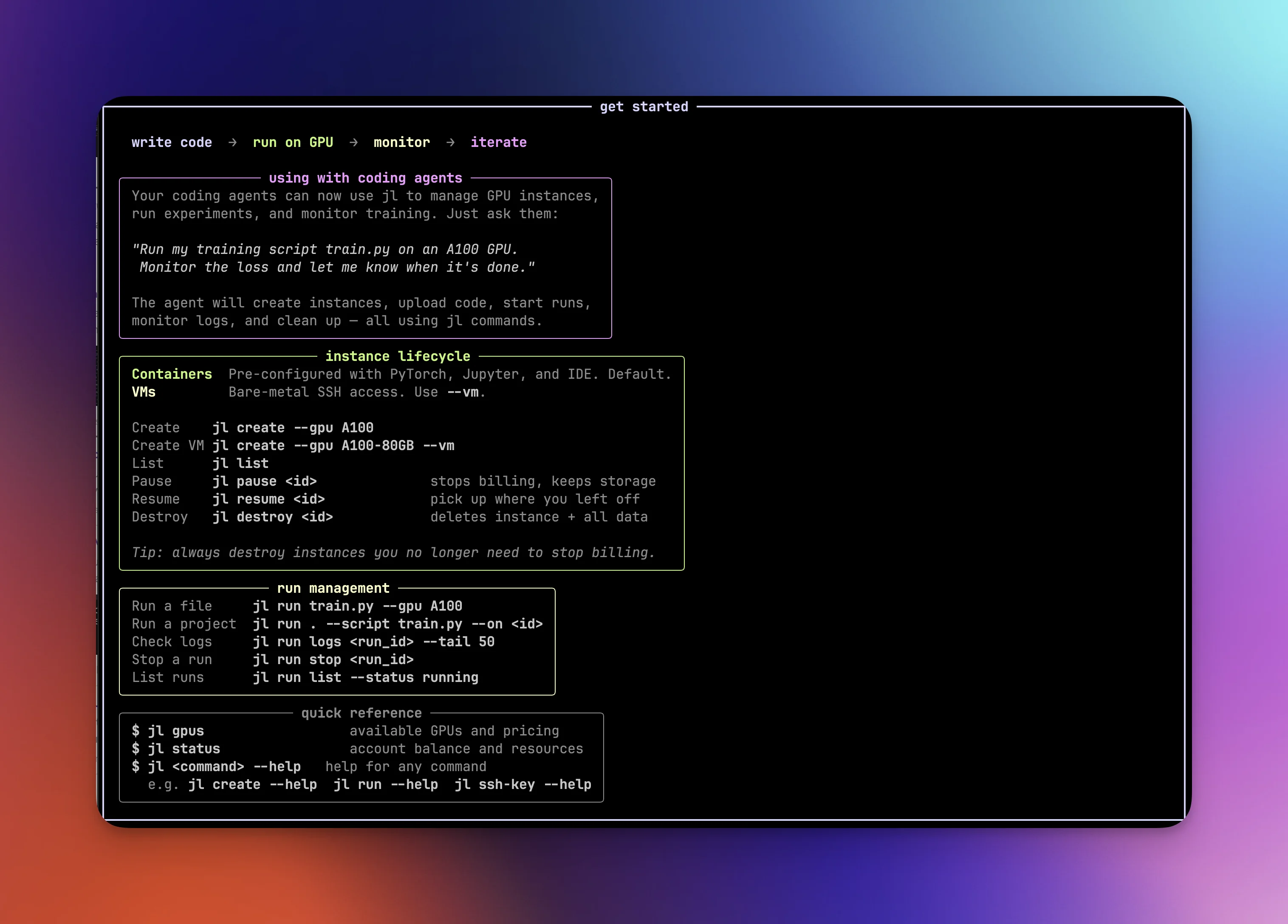
How it works
Installation and setup
# Install (either works)
uv tool install jarvislabs
# or: pip install jarvislabs

# Authenticate and install skill for popular coding agents
jl setup

# Or non-interactive (for CI, agents, scripting)
jl setup --token YOUR_TOKEN --agents all --yes
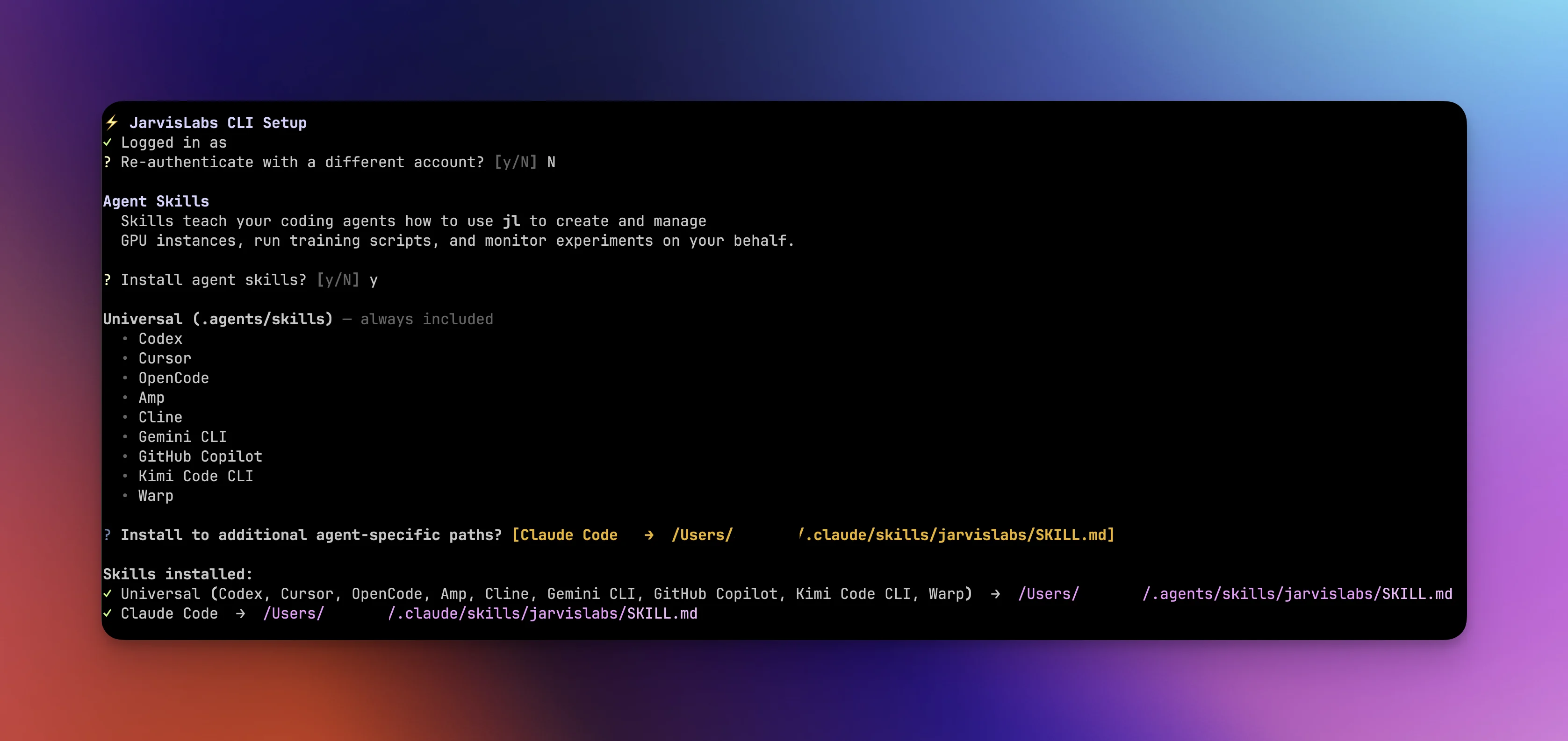
During setup, you're asked if you want to install agent skill files. If you say yes, a skill file is installed to ~/.agents/skills/, the shared skill directory that most coding agents read from, following the .agents/skills convention. This covers Codex, Cursor, OpenCode, Gemini CLI, and others. For agents with their own skill paths like Claude Code, you can install there too. The --agents flag does the same non-interactively. These skill files teach your agent how to use jl correctly, covering command patterns, monitoring loops, and common pitfalls. More on how agents use these in the monitoring section.
Managing instances
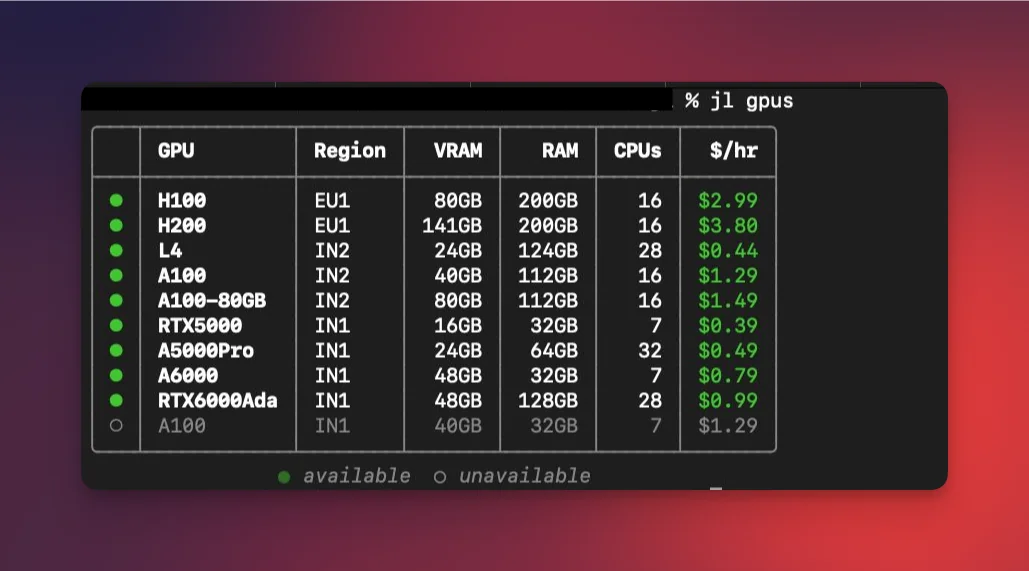
Start by checking what's available:
jl gpus
This shows real-time GPU availability and per-hour pricing across all regions. Green dots mean available, dim means sold out.
Once you've picked a GPU, create an instance:
jl create --gpu A100 --name "my-instance" --storage 100
Instances spin up fast. We recently made launches 4x faster in our IN2 (Noida) region, so you're typically SSH-ready in under 2 seconds. You can also request multiple GPUs with --num-gpus, expose HTTP ports with --http-ports 8080, or get a bare-metal VM with --vm when you need full system-level control (run Docker, install system packages, etc.). From there, jl ssh <machine_id> SSHes you into the machine, and jl exec <machine_id> -- nvidia-smi runs commands remotely without an interactive session.
When you're done working, jl pause stops compute billing while keeping your data, installed packages, and working directories intact. This is one of the more useful features: you can resume a paused instance on completely different hardware. Train on an A100, pause, and resume on an L4 for inference. Need more disk space? Resume with --storage 200 to expand it. You can also attach different filesystems or change startup scripts on resume. Everything carries over. When you no longer need the instance at all, jl destroy permanently removes it.
Running code
The previous section covers managing instances yourself, which gives you full control over the lifecycle. But if you just have a training script or a project directory locally and want to run it on a GPU without thinking about infrastructure, jl run is what you're looking for. It handles instance creation, code upload, environment setup, and cleanup in a single command. You can still pass flags like --num-gpus, --storage, --vm, and --http-ports to customize the instance.
There are three ways to use it.
Run a single script on a fresh GPU:
jl run train.py --gpu L4
This handles the full lifecycle in one command: creates an instance, uploads the script, creates a virtual environment that inherits template packages like PyTorch, runs the script, streams logs, and pauses the instance when the run completes. You don't touch any infrastructure.
Sync an entire project directory:
jl run . --script train.py --gpu A100
This rsyncs your project to the instance, auto-detects and installs dependencies from requirements.txt or pyproject.toml, and runs the specified script. You can also override with a custom requirements file via --requirements custom-reqs.txt, or run arbitrary setup commands before your script with --setup "pip install flash-attn".
Run on an existing instance:
jl run train.py --on <machine_id>
Uploads and runs on an instance you've already created. No new provisioning.
You can pass arguments to your script and add setup steps:
jl run train.py --gpu A100 -- --epochs 50 --lr 0.001 --batch-size 32

jl run . --script train.py --gpu A100 \
  --requirements requirements.txt \
  --setup "MAX_JOBS=4 pip install flash-attn"
By default, the CLI pauses the instance when your run finishes. You can change this with --destroy to clean up entirely, or --keep to leave the instance running so you can SSH in and inspect the results. If you hit Ctrl+C while logs are streaming, the run keeps going in the background. You can reconnect later with jl run logs <run_id> --follow.
Monitoring, file transfer, and filesystems
Once a run is going, you can check on it with jl run logs <run_id> --tail 50 for recent output, jl run status <run_id> for the current state, or jl run list --refresh to poll live status across all your tracked runs. If something needs to stop, jl run stop <run_id> sends a graceful TERM signal.
This monitoring flow is where agents really benefit from having the skill file installed. The skill file teaches agents a specific pattern: start the run detached with --json --yes, then poll at regular intervals. The log output includes a footer that tells the agent whether the run is still running, succeeded, or failed, so it knows exactly when to download results or investigate errors. We recommend running jl setup and installing the skills so your agent gets these patterns out of the box.
For moving data around, jl run . handles project syncing automatically, but sometimes you need to move files independently. Upload a dataset before starting a run, or pull trained model weights after one finishes:
jl upload <machine_id> ./data /home/data
jl download <machine_id> /home/results ./results -r
For data that needs to outlive any single instance, filesystems are persistent storage volumes that survive pause, resume, and even destroy. They're useful for large datasets or model checkpoints you want to reuse across experiments.
jl filesystem create --name "datasets" --storage 200
jl create --gpu A100 --fs-id <fs_id>
# Data available at /home/jl_fs/ on the instance
Python SDK
If you prefer working in Python or need to integrate GPU provisioning into your own scripts, everything above is also available as a Python SDK. Same pip install jarvislabs package, just import and go:
from jarvislabs import Client

with Client() as client:
    # Check availability
    for gpu in client.account.gpu_availability():
        if gpu.num_free_devices > 0:
            print(f"{gpu.gpu_type}: ${gpu.price_per_hour}/hr")

    # Create an instance
    inst = client.instances.create(gpu_type="A100", name="experiment")
    print(f"SSH: {inst.ssh_command}")

    # Clean up
    client.instances.pause(inst.machine_id)
This is useful for CI pipelines, custom orchestration, or any context where you need programmatic GPU access.
Working with coding agents
Every jl command supports --json for structured output and --yes for non-interactive execution. Here are some workflows to give you an idea of what's possible.
Autonomous fine-tuning
We gave Claude Code a simple prompt:
"Hey Claude, we just wrapped up the training script. Can you grab an A100 on JarvisLabs, kick off the training, keep an eye on it, and once it's done pull the adapter back here and pause the instance? Let's see how this experiment goes."
And it handled the rest:
Claude provisioned the GPU, started the run, monitored training over the course of the experiment, reported the final numbers, downloaded the adapter weights locally, and paused the instance.
The autoresearch loop
Karpathy's autoresearch is one of the most compelling agent patterns out there. The agent modifies train.py, runs it, checks if the metric improved, keeps or discards the change, and repeats. Each experiment takes about 5 minutes. Set it up before bed, and by morning the agent has worked through 100+ experiments, tried dozens of ideas you wouldn't have gotten to yourself, and committed only the improvements to your git history.
You can use the same pattern with jl. Create an instance, then let the agent iterate:
LOOP:
  1. Agent modifies train.py with an experimental idea
  2. jl run --on <id> --json --yes -- python3 train.py
  3. jl run logs <run_id> --tail 10  (check results)
  4. If improved → keep the change, commit
  5. If not → revert, try next idea
  6. Repeat
A single agent can run experiment loops in parallel across multiple instances. Use an L4 for quick 5-minute iterations and an H100 with --num-gpus 2 for the ideas that need more compute. Scale up when something looks promising, scale down for exploratory runs. The agent manages all of it.
The pattern itself extends beyond ML training to any problem with a verifiable outcome. We used a version of it to stress-test this CLI itself, which we'll get into below.
Parallel experiments across multiple GPUs
Agents can manage multiple experiments at the same time. Provision a few instances on different hardware, launch a run on each with different hyperparameters, and let the agent cycle through jl run logs on each one. It compares metrics, pauses underperforming runs early, and lets promising ones continue.
jl run train.py --gpu L4 -- --batch-size 32
jl run train.py --gpu A100 -- --batch-size 128
jl run train.py --gpu A100 --num-gpus 2 -- --batch-size 256
jl run train.py --gpu H100 -- --batch-size 512
This kind of parallel experimentation is tedious to manage manually but straightforward for an agent that can poll four log streams in a loop.
Model serving
Spin up a GPU with an exposed port, deploy a FastAPI app, and you have a model endpoint:
# Create an instance with an exposed HTTP port
jl create --gpu L4 --http-ports 8080 --name "model-api" --json --yes

# Deploy a FastAPI application
jl run app.py --on <machine_id> --json --yes

# Retrieve the public endpoint
jl get <machine_id> --json | jq '.endpoints'

# Query the model
curl https://<endpoint>/predict -d '{"text": "Hello world"}'
More ideas
Automated hyperparameter search. Have your agent iterate through combinations of --lr, --batch-size, and --depth using jl run, log results, and identify the best configuration overnight.
GPU benchmarking across hardware. Run the same training script on L4, A100, and H100. Since jl supports resuming on different hardware, you can benchmark the same environment across GPU types.
GPU in CI/CD. Any test that needs a real GPU (training smoke tests, inference validation, CUDA kernel testing, model export verification) can use the Python SDK to provision hardware on demand, run the test, and tear down.
Bare-metal VMs. jl create --gpu A100 --vm gives you a full VM with Docker, system packages, and complete control over the environment. Same CLI workflow.
How we tested: agents testing a tool built for agents
Once the CLI was at a respectable stage, we dogfooded it the only way that made sense for a tool built for agents. We pointed Claude Code and Codex independently at jl for 12 continuous hours each and let them do real GPU work. The directive was simple:
"You are an autonomous agent with GPU access. Your job: use the
jlCLI to do real GPU work for 12+ hours straight. LoRA fine-tuning, distributed training, model serving, multi-instance orchestration. Along the way, you are stress-testing the CLI itself. Every friction point, bug, and UX issue gets documented. You are NOT just running CLI commands in isolation. You are a researcher doing real experiments. Write your own scripts. Pick your own datasets. Debug your own issues."
The agents wrote all code from scratch. Training loops, FastAPI apps, data loaders, DDP scripts. They picked their own datasets, debugged their own errors, and worked through 13 phases of testing: CLI smoke tests, VM instances, LoRA fine-tuning, multi-GPU distributed training, managing 4 instances simultaneously, filesystem persistence, model serving, 4-hour endurance runs, and edge case stress tests. Just an agent doing the same work a researcher would, continuously, for 12 hours.
The key difference from autoresearch: in the original, a failed experiment gets discarded. In our version, a failed experiment is a result. A CLI crash, a confusing error message, a file transfer that silently fails, those are exactly what we want to find. Each agent produced three documents after its session: progress.md (a timestamped experiment journal, updated after every single experiment), bugs.md (confirmed bugs with exact reproduction commands and severity ratings), and notes.md (UX friction, missing features, surprising behavior, and things that would trip up an agent workflow).
We reviewed everything, fixed the bugs, improved the error messages, and smoothed out the friction points. Then we ran the agents again and repeated the cycle.
What's next
The CLI was built with both humans and agents in mind from day one. We're intentionally keeping the command surface small. A focused tool that agents can use effectively is more valuable than a sprawling one with flags nobody uses.
This is an early release. The core functionality is solid, and we use jl heavily internally for our own experiments and research. Sign up on JarvisLabs and you can get running in three commands:
uv tool install jarvislabs
jl setup
jl run your_script.py --gpu A100
- CLI documentation: docs.jarvislabs.ai/cli
- SDK documentation: docs.jarvislabs.ai/sdk
Let us know at hello@jarvislabs.ai what features you want to see next, what friction you hit, and what workflows you're using it for. We're also launching serverless GPU inference soon, which will pair nicely with the CLI. Keep an eye out for that.